


adams19209293
Inspiring
Dec 25, 2016 6:08 PM UTC
Answered

Animate Won't 'Save' files and Corrups the Existing file.

Recently, out of nowhere the program has been giving me this message...
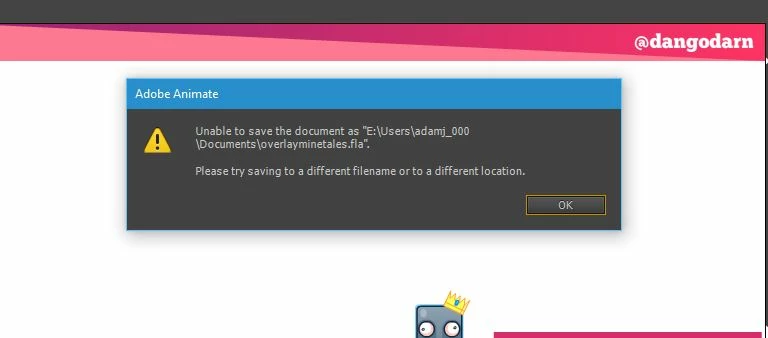
When I save as another name it corrups the file.


I've re-installed the program multiple times. It's completely debilitating and I've had to ask for extra time from a client!

I have no idea why Adobe don't offer live support for Animate. It's very irritating!

I hope you can help soon!I'd appreciate it.

Thanks,

Adam.

    This topic is closed to new replies. Start a new post to keep the conversation going.
    adams19209293
    adams19209293Correct answer
    Inspiring
    Dec 26, 2016 5:16 PM UTC

    it's hard to say.

    but you should be able to create a directory on any non-restricted area that you want use to save your files.  you don't have to use a desktop directory.

    (p.s when using the adobe forums, please mark helpful/correct responses, if there are any.)


    I knid of understand now.

    I reinstalled off a hard drive onto my main harddrive.

    I'm guessing the old harddrive's permissions are a little messed up because I've given it read/write perms but Adobe still won't save over files only save them a new, and even that messes up sometmies. I'll just save to my main hard drive if there's no actual fix you can think of? I doubt adobe support would be very helpful as it's a very specfic set of circumstances.

    Thanks kglad, and I'll mark as helpful.

    Adam.

    23 replies

    Participant
    Nov 9, 2024 5:33 AM UTC

    i have the same problems but when i save it in a new directory it still won't work. Helppp


    Translate
    kglad
    Community Expert
    Community Expert
    Nov 9, 2024 5:44 AM UTC

    what's the full path where you're trying to save?

    Translate
    Participant
    Nov 9, 2024 5:47 AM UTC

    C:\User\User\Desktop

    Translate
    jakeb69178018
    Participant
    Aug 7, 2018 1:36 PM UTC

    Any insight on this Adobe?

    I have lost hours of work because of this issue. Please fix it or give legitimate help.

    Translate
    kglad
    Community Expert
    Community Expert
    Aug 7, 2018 3:23 PM UTC

    these are user-to-user forums.

    Translate
    jakeb69178018
    Participant
    Aug 8, 2018 1:35 AM UTC

    Oh. Right. Oops.

    I was able to find a temporary file that recovered my work and saved that as a new file.

    Then the same issue occurred after a few hours ... so I went back and found the temporary file again but didn't save it because I thought it might corrupt it and wanted to open and close Animate CC.

    Which seems to be a mistake. I think it deleted that temporary file and now I'm only left with the corrupt .fla. Do you know if the temporary file was moved somewhere/is recoverable? Or am I just shit out of luck?

    Translate
    Participant
    Jul 19, 2018 11:39 AM UTC

    I have the same problem. I can not save a .fla file on my Macbook Pro (High Sierra v. 10.13.6) in Adobe Animate CC version 18.0.2

    I tried re-installing Animate, also older versions of it.

    I tried re-installing MacOS.

    I tried setting permissions of a folder where I want to save it.

    I did a Disk utility check in recovery mode, everything ok.

    I've reset the preferences of Animate.

    The only thing that works is saving as a *.xfl file. But this is not a solution because when I do "control>test" (command Return), it tries to save .TMP.fla in the Library/Application Support folder, but saving a .fla file seems not to work and causes the error.

    Does anyone have a solution?

    Translate
    Participant
    Jul 19, 2018 12:09 PM UTC

    I found the solution that worked for me.

    I have reset my Home Folder Permissions, found instructions here: https://appletoolbox.com/2016/07/fix-corrupt-user-accounts-macos/

    So for me it was only a MacOS problem, Animate works fine now.

    Translate
    Participating Frequently
    Feb 5, 2018 4:03 PM UTC

    What do preferences have to do with it?

    Translate
    kglad
    Community Expert
    Community Expert
    Feb 5, 2018 7:25 PM UTC

    they may be corrupted.

    Translate
    Participating Frequently
    Feb 5, 2018 3:41 PM UTC

    I have been running into this issue lately. I try saving it not only under a different name but also on a different hard drive. Then it doesn't work and I have no choice but to quit the program and the file is corrupted. I now am saving it two different locations regularly in case this happens again (which it has) because one day last week I lost several hours worth of work. Is Adobe working to fix this issue?

    Translate
    kglad
    Community Expert
    Community Expert
    Feb 5, 2018 3:59 PM UTC

    reset your preferences -

    http://helpx.adobe.com/flash/kb/re-create-preferences-flash-professional.html

        (or remove Win:  C:\Users\<username>\AppData\Local\Adobe\Animate CC 2017\ and

                                      C\Users\<username>\AppData\Roaming\Adobe\Animate\2017\

                            Mac:   /Users/<username>/Library/Application Support/Adobe/Animate CC 2017/ and

                                        /Users/<username>/Library/Preferences/Adobe/Animate/2017/)

    Translate
    kglad
    Community Expert
    Community Expert
    Dec 25, 2016 11:33 PM UTC

    create a new directory on your desktop.

    create a new fla and save it to the new desktop directory.

    close and fla and then reopen it.

    any problem?

    Translate
    adams19209293
    Inspiring
    Dec 26, 2016 11:31 AM UTC

    There dosent seem to be yet. saved it a few times and no error!

    Why is that?

    Thanks kglad

    Translate
    kglad
    Community Expert
    Community Expert
    Dec 26, 2016 3:59 PM UTC

    it's hard to say.

    but you should be able to create a directory on any non-restricted area that you want use to save your files.  you don't have to use a desktop directory.

    (p.s when using the adobe forums, please mark helpful/correct responses, if there are any.)

    Translate