
December 27, 2019
Answered

Animate zoom issue 2020

  • December 27, 2019
  • 1 reply
  • 644 views

Hey all!


After I zoom in past the 400% mark, a grid pops up and I cannot figure out how to disable it. Is this a new locked in feature? It just slows my computer down.

My grid is off, and I cannot find another way to mess with the settings. 


Thank you all for your help!

-Nick
This topic has been closed for replies.
Correct answer n. tilcheff

Hi mate,


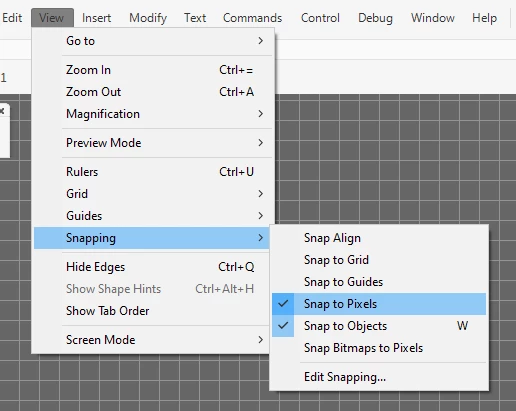
I suspect that this is the 'snap to pixels' grid.

Just turn it off and the grid will disappear.


1 reply

n. tilcheff
n. tilcheffCorrect answer
Legend
December 31, 2019

Hi mate,


I suspect that this is the 'snap to pixels' grid.

Just turn it off and the grid will disappear.


Nick - Character Designer and Animator, Flash user since 1998 | Member of the Flanimate Power Tools team - extensions for character animation
Participant
May 30, 2024

Hi i turned of snap to pixels yet im still seeing this grid. I don't know what im doing wrong i've tried everything its just really fruststrating

kglad
Community Expert
Community Expert
May 30, 2024

mouse over "grid"