
Participant
November 13, 2018
Answered

animating rotation by changing pivot points

  • November 13, 2018
  • 1 reply
  • 3771 views

im trying to animate something in animate. basically i want it to be like this
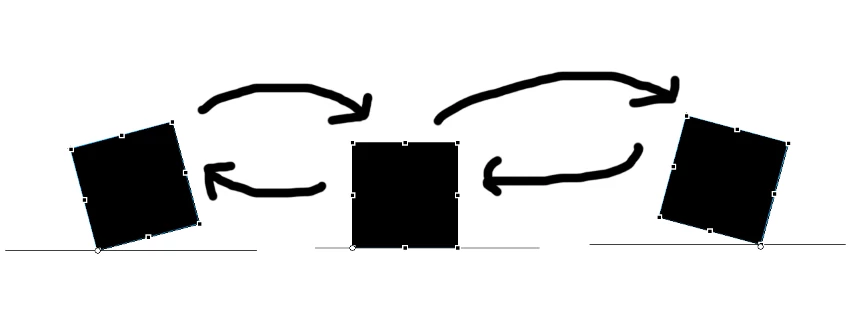
i tried rotating it by changing the pivot points but somehow it wont work, the results ended up being the square rotated from the original pivot point or where ever i put the pivot point last. are there any workarounds for this?

This topic has been closed for replies.
Correct answer JoãoCésar17023019

Hi.

One way of achieving this is firstly placing the Transformation Point at the bottom left corner. Then, when the box is already resting on the ground, you create another keyframe and place the Transformation Point at the bottom right corner.

Here is a sample:

animate_cc_box_rotation.zip - Google Drive

Regards,

JC

1 reply

JoãoCésar17023019
Community Expert
JoãoCésar17023019Community ExpertCorrect answer
Community Expert
November 13, 2018

Hi.

One way of achieving this is firstly placing the Transformation Point at the bottom left corner. Then, when the box is already resting on the ground, you create another keyframe and place the Transformation Point at the bottom right corner.

Here is a sample:

animate_cc_box_rotation.zip - Google Drive

Regards,

JC

Participant
November 13, 2018

what if you were to use tweening? my pivot keeps changing whenever i tried to move it accordingly

JoãoCésar17023019
Community Expert
Community Expert
November 13, 2018

It works with tweens too. I just converted mine to frame-by-frame animation.

The important thing is that you keep the beginning and end of the same tween with the the Transformation Point at the same position.