
Participating Frequently
January 18, 2019
Answered

Animation breaks completely after second time testing or publishing

  • January 18, 2019
  • 1 reply
  • 724 views

I'm publishing to html / js

On multiple files if I publish or test the animation it works as expected. Then if I do it again, without changing a single thing, the animation completely breaks- things flashing in and out and half mutating and other things. There are no JS errors when it behaves like this. Does this behaviour sound familiar to anyone?

I can link a working and a broken output if anyone wants to poke around at them
This topic has been closed for replies.
Correct answer kglad

both flas produce a broken animation when published more than once, but broken.fla should do it right away as I saved it after publishing once.

To be clear, the "broken" ness of the animation is a sporadic blinking in and out of the lines. The desired animation should be the brush appearing from behind the palette and moving in front of it


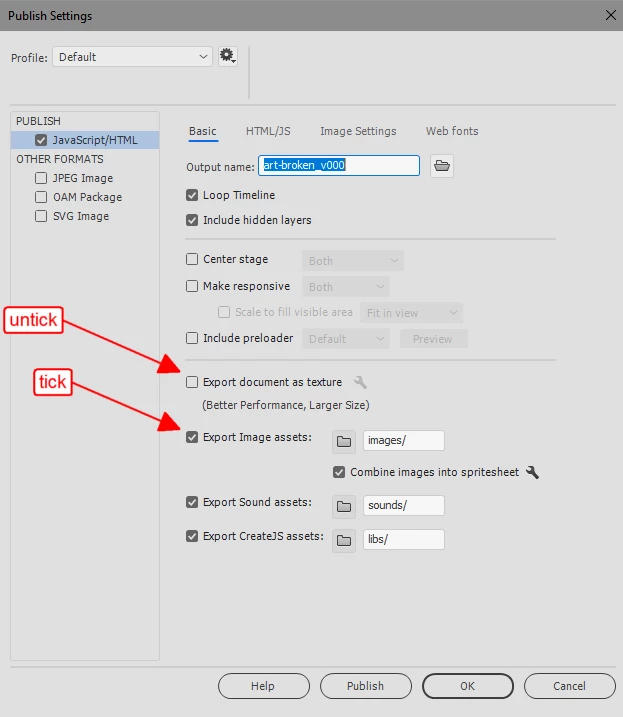
change your publish settings:

1 reply

kglad
Community Expert
Community Expert
January 18, 2019

what's it say in the developer console?

Participating Frequently
January 21, 2019

WARNINGS:

** 46 Bitmaps packed successfully into 1 spritesheet(s).

Frame numbers in EaselJS start at 0 instead of 1. For example, this affects gotoAndStop and gotoAndPlay calls. (4)

kglad
Community Expert
Community Expert
January 21, 2019

that's in the animate output panel, not the developer console.

google your browser and how to use the developer console.