hi preran,
after an elaborate chat including a remote session with one of the tech-support members there is still no progress on the issue.
he actually forwarded the case to his superior, resulting in an email the next day that I should try to reset my preferences and then test again.
I tried resetting and did a test again with the defaults, it is still not working.
I also tried on two other machines, one already updated to animate cc 2019, the other one still at animate cc 2018 – not working on both of them.
so I really don’t think it has anything to do with any kind of preferences set on my computer.
as I mentioned when chating with one of your tech-support guys there are workarounds, but still it would be great to use that feature since in my opinion it is the only way to accurately control the easing of an animation in animate using motion tweens.
just an example using one of the easing-presets with motion tweens:
animation duration total 2 seconds, object moves 1 second, then just stays put.
continuous motion tween, just one keyframe added at 1s to set the end position of the object.
adding easing all the sudden the duration of the movement is no longer 1 second (which I would expect, since I set the keyframe there) but the object is already at the end position at around frame 16.
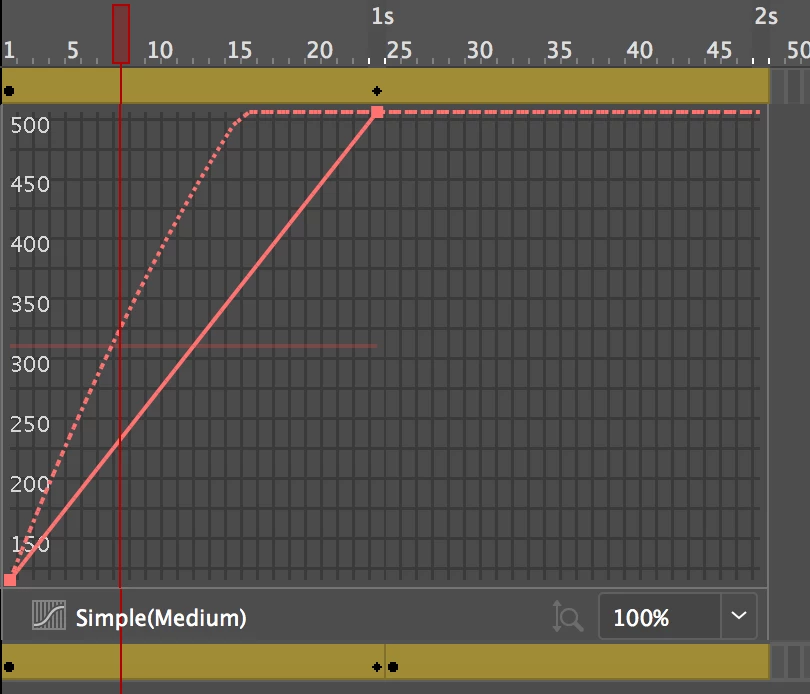
workaround:
create an additional, separate keyframe right after the keyframe setting the end position – then all the sudden the easing preset uses the actual length from keyframe to keyframe to calculate the easing.
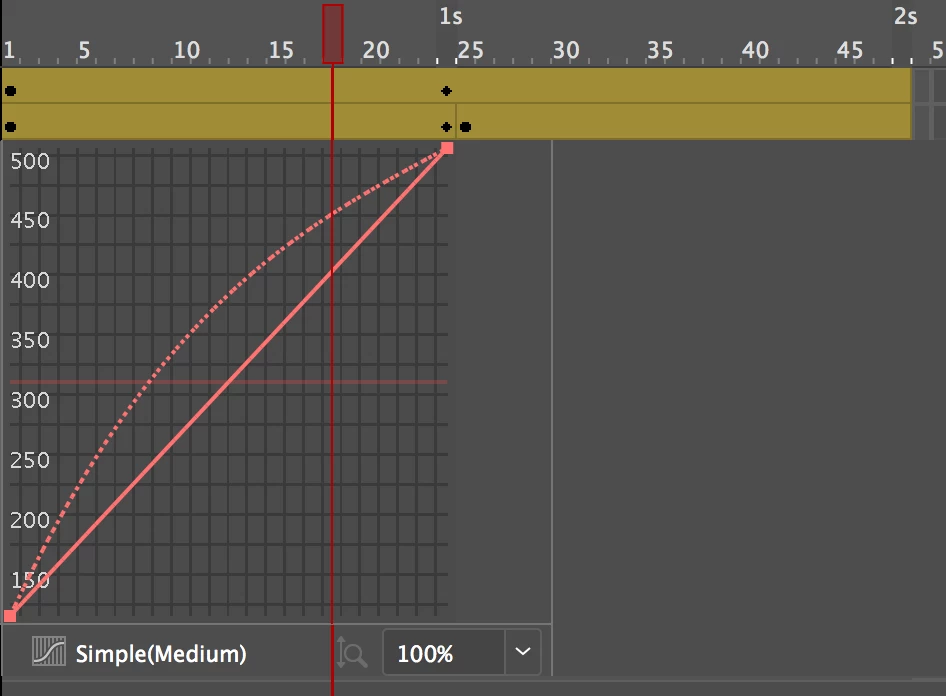
this is mainly the reason why I don't like working with the presets - if I set a keyframe at a specific time I do that for a reason and I don't want the easing to mess with the timing - I just want it to ease...
plus using the in and out tangents I can control the animation curve way more accurate.
regards,
peter
Thank you for the detailed info. I am sorry that we couldn't do more to help.
You can post a bug / feature request with the team directly using this link Feature Request/Bug Report Form
Thanks,
Preran

 AdChoices