Inspiring
April 23, 2022
Answered

Animations get error when exporting as sprite sheet

  • April 23, 2022
  • 2 replies
  • 2748 views

Hi

I made a simple animation (please check the attached files)

in that the animation looks perfect,

and in the SWF also it is perfect


but if I export the animations as a sprite sheet, I get this error https://prnt.sc/pqNM1z6Bu02b

a piece of the object is visible in the corner (annoyingly)


I tried all the settings in the generate sprite window, but nothing works


if I draw a square to cover the animation and export it, it looks ok

but the sprite size become bigger than my requirement which is 2048x2048


sorry for my bad English,

I have attached the video file for a better understanding of the issue

please download the animate file here https://dl.dropboxusercontent.com/s/dufwb0d6w4dtnd6/Error.fla


please help me to solve this, I have many animations clips like this and this problem is annoying


Thanks
This topic has been closed for replies.
Correct answer Mario_CR

Hello, there are 2 bugs with the spritesheet generator that are yet to be fixed:

One is the incorrect clipping that often happens with parented layers and imported assets, and the other is the lack of support for frame filters.


After looking at your file, I did manage to export the spritesheet by using a few workarounds:

First, the clipping problem. Use the alpha filter directly on the movie clip instead of the frame, convert all the tweens to frame by frame animation and merge down the layers (I guess this makes it easier for the program to calculate the content margins of each frame?).

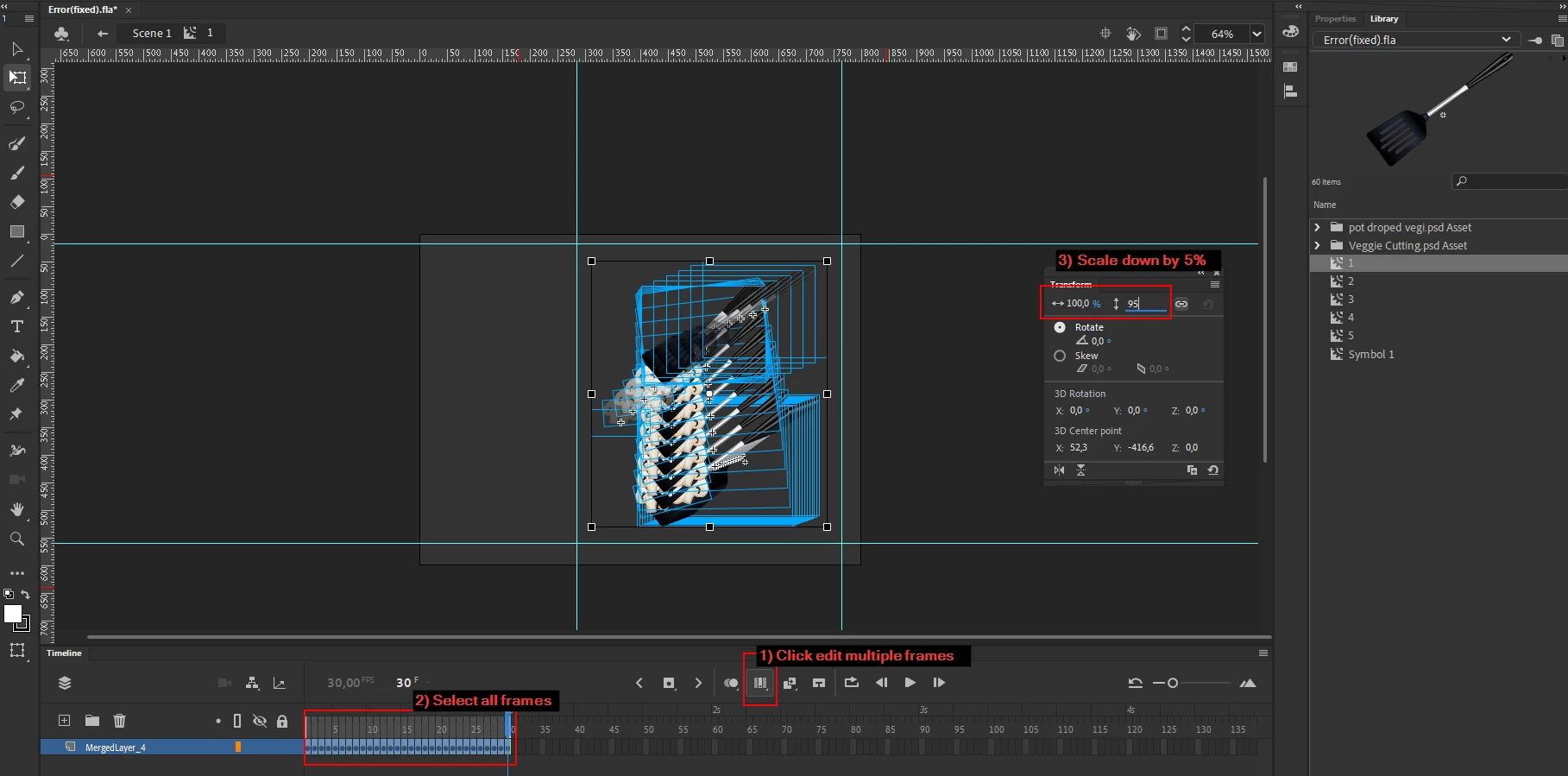
As for the 2048 x 2048 spec, I decreased the scale of the movie clip frames by 5% by highlighting them using Edit Multiple Frames, selecting all objects with the free transform tool then setting the scale to 95% from the Transform window in order to just barely hit the size limit;


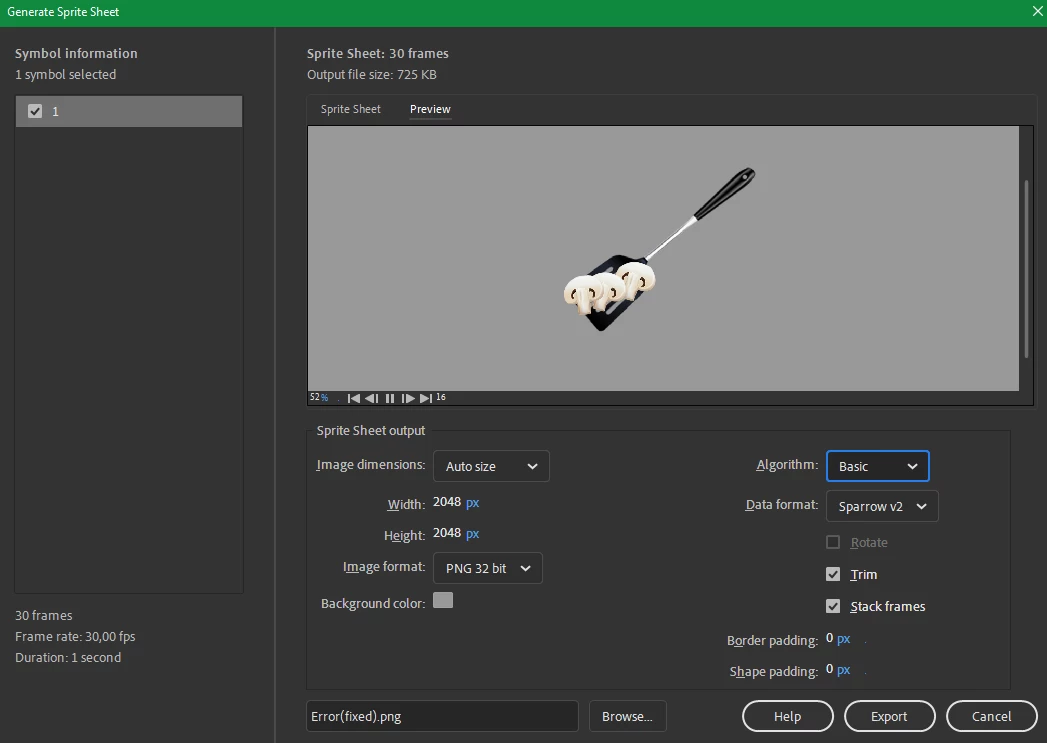
Lastly, I generated the spritesheet using these settings:

Note: Algorithm can be Basic or MaxRects but format has to be Sparrow v2 in order to enable "Trim". Without it, each frame is going to be much larger.


Here's the link of the fixed FLA just in case. Let us know if this works for you:

https://drive.google.com/file/d/1jhq_aZc9nU_u0LRKBEMlOHfHLCeslz0C/view?usp=sharing


2 replies

Mario_CR
Community Expert
Mario_CRCommunity ExpertCorrect answer
Community Expert
April 26, 2022

Hello, there are 2 bugs with the spritesheet generator that are yet to be fixed:

One is the incorrect clipping that often happens with parented layers and imported assets, and the other is the lack of support for frame filters.


After looking at your file, I did manage to export the spritesheet by using a few workarounds:

First, the clipping problem. Use the alpha filter directly on the movie clip instead of the frame, convert all the tweens to frame by frame animation and merge down the layers (I guess this makes it easier for the program to calculate the content margins of each frame?).

As for the 2048 x 2048 spec, I decreased the scale of the movie clip frames by 5% by highlighting them using Edit Multiple Frames, selecting all objects with the free transform tool then setting the scale to 95% from the Transform window in order to just barely hit the size limit;


Lastly, I generated the spritesheet using these settings:

Note: Algorithm can be Basic or MaxRects but format has to be Sparrow v2 in order to enable "Trim". Without it, each frame is going to be much larger.


Here's the link of the fixed FLA just in case. Let us know if this works for you:

https://drive.google.com/file/d/1jhq_aZc9nU_u0LRKBEMlOHfHLCeslz0C/view?usp=sharing


Paari_GDAuthor
Inspiring
May 2, 2022

Thanks for the effort @Mario_CR 

I really appreciate it...

it's really helpful...

kglad
Community Expert
Community Expert
April 23, 2022

increase your image dimensions

Paari_GDAuthor
Inspiring
April 25, 2022

Hi, @kglad thanks for the reply!


I have tried that method also

but I don't what my sprite size is more than 2048x2048,

can you please check the file here https://dl.dropboxusercontent.com/s/dufwb0d6w4dtnd6/Error.fla

Colin Holgate
Inspiring
April 25, 2022

That file is ActionScript 3, which would not involve spritesheets. Converting it to HTML5 Canvas and publishing gives a spritesheet that is 512x512.