


Participant
Apr 24, 2023 12:43 PM UTC
Answered

Animations with buttons and camera angle help

Hi, I have pupils who have done an animation with buttons, but because they have camera angles and zoom, the buttons are jumping all over the screen. Can any one help with a pupil friendly response to help resolve this.

    This topic is closed to new replies. Start a new post to keep the conversation going.
    JoãoCésar17023019
    JoãoCésar17023019Correct answer
    Community Expert
    Apr 24, 2023 12:50 PM UTC

    Hi.


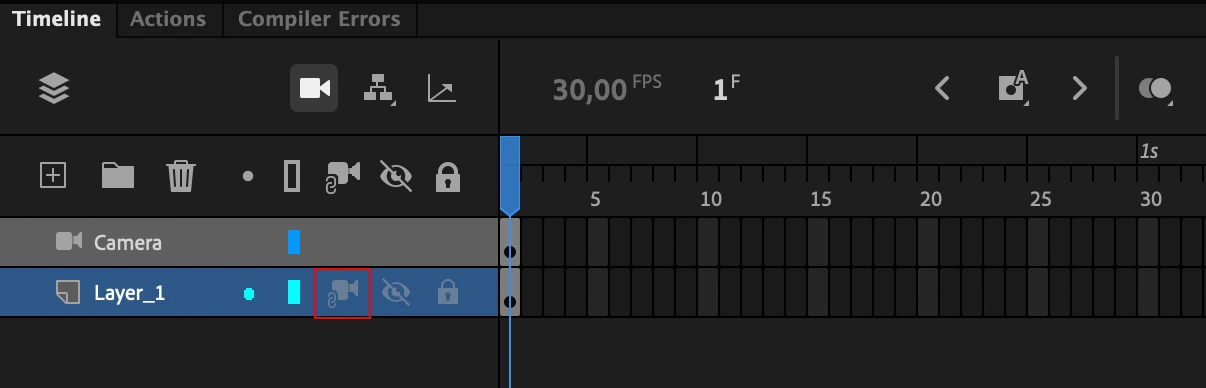
    Go to the layer that contains the buttons and click on the icon (third from the right) to attach the layer to the camera.


    Regards,

    JC

    2 replies

    JoãoCésar17023019
    Community Expert
    JoãoCésar17023019Community ExpertCorrect answer
    Community Expert
    Apr 24, 2023 12:50 PM UTC

    Hi.


    Go to the layer that contains the buttons and click on the icon (third from the right) to attach the layer to the camera.


    Regards,

    JC

    Translate
    Participant
    Apr 24, 2023 12:52 PM UTC

    I will try that, thank you!

    Translate