
pawelk15640242
Known Participant
July 23, 2018
Answered

Anyone know what I have to fill in for function getData() in my program? AdobeAnimate3.0 C++

  • July 23, 2018
  • 2 replies
  • 490 views

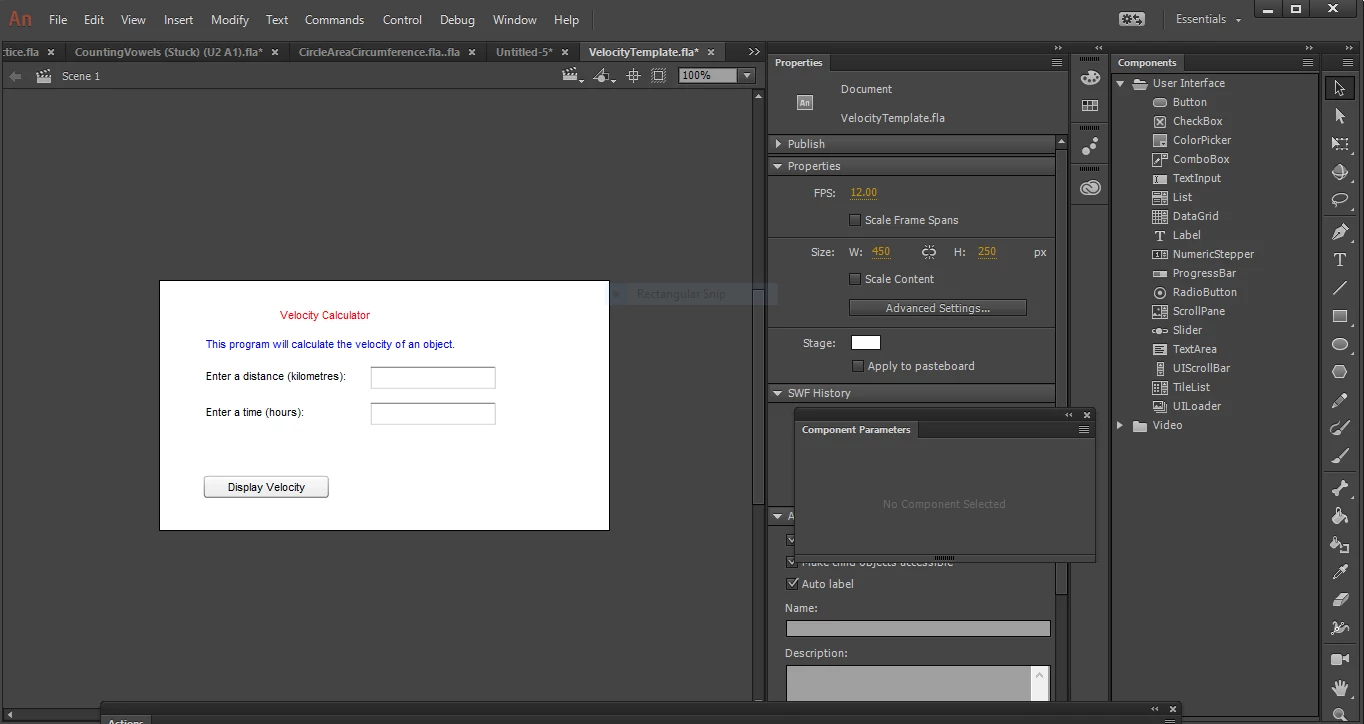
This is the coding I made. But its missing something in order for the program to work, other wise the lblOutput will just give me N/A when calculating Velocity. Theres a function writtin below, and I have to get data somehow. Would anyone know what I have to fill in?

// Name:

// Date:

// Purpose: To calculate the velocity of an object

// This line makes the button, btnDisplay wait for a mouse click

// When the button is clicked, the displayVelocity function is called

btnDisplay.addEventListener(MouseEvent.CLICK, displayVelocity);

// These lines make the textinputs wait for a mouse click

// When any of these components are clicked, the clearLabels function is called

txtinDistance.addEventListener(MouseEvent.CLICK, clearLabels);

txtinTime.addEventListener(MouseEvent.CLICK, clearLabels);

// Declare Global Variables

var distance:Number;   // distance

var time:Number;       // time

// This is the displayVelocity function

// e:MouseEvent is the click event experienced by the button

// void indicates that the function does not return a value

function displayVelocity(e:MouseEvent):void

{

// declare the variables

var velocity:Number;      // velocity

getData();

velocity = distance / time;

lblOutput.text = "The velocity is: " + velocity.toFixed(1) + " km/h.";

}

// This is the getData function

// It gets the distance and time from the user

function getData()

{ // get data                                                           <--This part right here.

// This is the clearLabels function

// e:MouseEvent is the click event experienced by the textInput

// void indicates that the function does not return a value

function clearLabels(e:MouseEvent):void

{

     lblOutput.text = "";

}

here is the program I made, sorry its small, try to zoom in
This topic has been closed for replies.
Correct answer JoãoCésar17023019

As kglad said, you should define the distance and time. For this, you have to get the text typed by the user. Like this:

function getData():void

{

     distance = Number(txtinDistance.text);

     time = Number(txtinTime.text);

}

Regards,

JC

2 replies

JoãoCésar17023019
Community Expert
JoãoCésar17023019Community ExpertCorrect answer
Community Expert
July 23, 2018

As kglad said, you should define the distance and time. For this, you have to get the text typed by the user. Like this:

function getData():void

{

     distance = Number(txtinDistance.text);

     time = Number(txtinTime.text);

}

Regards,

JC

pawelk15640242
Known Participant
July 23, 2018

I simply added that, and my program worked. Instead of just giving N/A, it calculated. But I don't understand how I didn't define it. I made distance and time a Global Variable outside the function.

JoãoCésar17023019
Community Expert
Community Expert
July 23, 2018

Excellent!

It's because you declared the variables but they didn't have a value stored yet.

You could've written:

var distance:Number = 100;

var time:Number = 2;

But the value would always be the same everytime you click the button. That's why you need to get the values entered by the user.

kglad
Community Expert
Community Expert
July 23, 2018

distance and time are undefined and the following should trigger an error (but even when you close that bracket it will do nothing).

// This is the getData function

// It gets the distance and time from the user

function getData()

{ // get data                                                           <--This part right here.

p.s. it looks like distance and time should be defined in getData(). eg:

function getData():void{

distance=Number(distance_tf.text);

time=Number(time_tf.text);

}

pawelk15640242
Known Participant
July 23, 2018

I thought I defined them before in this part

// Declare Global Variables

var distance:Number;   // distance

var time:Number;       // time

But I added your work underneath "//get data" but I got an error. It did not recognize the "tf.text" It said I have to define that too.