Answered
Apply height of one movie clip to other movie clip in HTML5
Hi,
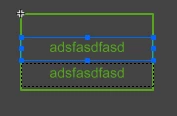
can somebody help me? I have multiline dynamic text field and I need to copy height of text field and apply to movie clip (box under textfield) height.
thank you 😉
Hi,
can somebody help me? I have multiline dynamic text field and I need to copy height of text field and apply to movie clip (box under textfield) height.
thank you 😉
The HTML5 canvas element has no direct means to get the height of rendered text, so the best the CreateJS API can do is estimate it from the current font size. The API function getMeasuredHeight() does this.
Also, the CreateJS API has no means to directly set the width/height of a symbol. All you can do is set the scale factor. So to resize a symbol to specific dimensions you have to do some math and scale it based on a percentage of its default size, which is stored in its nominalBounds property.
So to kind-of set a symbol to the height of a text object, you'd do something like:
this.mySymbol.scaleY = this.myText.getMeasuredHeight() / this.mySymbol.nominalBounds.height;
(not tested, may fail horribly)
Already have an account? Login
Enter your E-mail address. We'll send you an e-mail with instructions to reset your password.
 AdChoices