
Inspiring
March 3, 2016
Question

ArgumentError: Error #2108: Scene blue was not found.

  • March 3, 2016
  • 1 reply
  • 1001 views

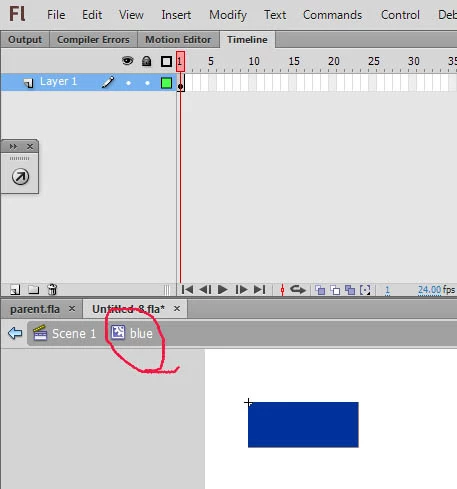
i want to go From main timeline to symbol timeline

movieClip_1.addEventListener(MouseEvent.CLICK, fl_ClickToGoToScene);

function fl_ClickToGoToScene(event:MouseEvent):void

{

  MovieClip(this.root).gotoAndPlay(1, "blue");

}
This topic has been closed for replies.

1 reply

robdillon
Participating Frequently
March 3, 2016

You don't want to use the name of the current scene when you use gotoAndPlay() or gotoAndStop(). Try:

MovieClip(this.root).gotoAndPlay(1);

Using scenes is a very bad practice. It is a remnant from the very early versions of Flash.

robdillon
Participating Frequently
March 3, 2016

I replied too quickly. You are editing a symbol, not a scene. In your example "blue" is a movieClip. If that is a movieClip with frames and you have it stopped on a frame and you want it to play through its timeline, then you should be using:

blue.play();

It's difficult to tell, the timeline shows the Library name for the movieClip, but not the instance name. You need to use the instance name, without quotation marks, followed by the command play(); to play the movieClip.

In any case, don't use scenes.

Inspiring
March 4, 2016

I tried to target a movieclip from inside another movieclip called ball and these dont work!

stop();

movieClip_1.addEventListener(MouseEvent.CLICK, fl_ClickToGoToScene);

function fl_ClickToGoToScene(event:MouseEvent):void

{

MovieClip(root).ballmc.play();

}