
Known Participant
June 5, 2010
Answered

AS3 Flash Preloader

  • June 5, 2010
  • 2 replies
  • 1987 views

Hey Guys,

I've been trying to get this preloader working for days! I finally got it working, and now when i upload it to my site and refresh the page, the .swf file is stuck at the preloader screen.

This is my code:

//Stop Frame
stop();

//Create a listener to call the loading function as the movie loads
this.loaderInfo.addEventListener (ProgressEvent.PROGRESS, loading);

//Runs when the loading progress has changed
function loading(event:ProgressEvent):void
{
//Determine the percent loaded from bytesLoaded and bytesTotal
var percent:Number = event.bytesLoaded / event.bytesTotal * 100;

//Stretch a progress bar
progressBar.scaleX = percent / 100;

//Set the progressText text box to the percent loaded
progressText.text = int(percent) + "%";

//When the load is finished, go to frame 2
if(percent == 100)
{
this.gotoAndStop(2);
}
}

I've been reading up on it for a while now, but I can't seem to figure it out. I'd really appreciate it if I can get some advice as to what to do.
This topic has been closed for replies.
Correct answer kglad

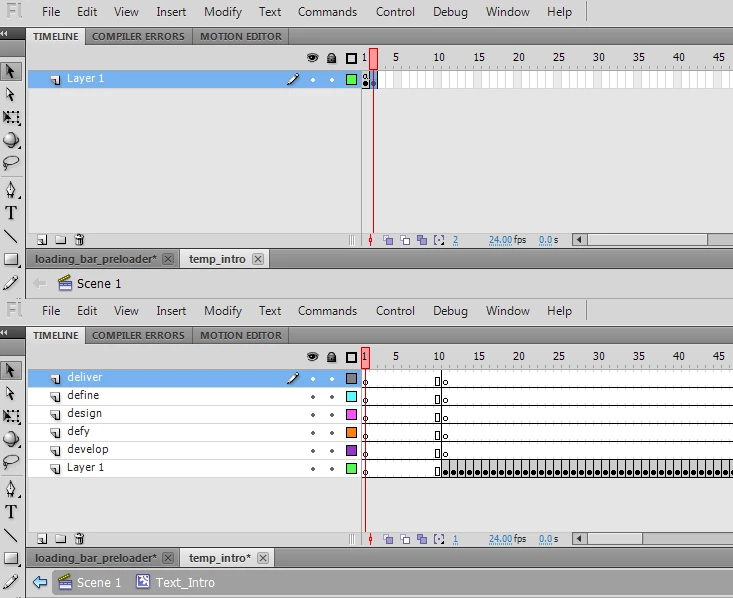
If this helps, the first image is a screen cap of Scene 1 of my movie and the second screen cap is of a movieclip inside the second keyframe of Scene 1. the movie clip is where all my animation is.


clear your cache and change f() to:

function f(e:Event){

this.gotoAndStop(2);

}

2 replies

kglad
Community Expert
Community Expert
June 5, 2010

:


//Stop Frame
stop();

this.loaderInfo.addEventListener(Event.COMPLETE,f);

function f(){

this.gotoAndStop(2);

}


//Create a listener to call the loading function as the movie loads
this.loaderInfo.addEventListener (ProgressEvent.PROGRESS, loading);

//Runs when the loading progress has changed
function loading(event:ProgressEvent):void
{
//Determine the percent loaded from bytesLoaded and bytesTotal
var percent:Number = event.bytesLoaded / event.bytesTotal * 100;

//Stretch a progress bar
progressBar.scaleX = percent / 100;

//Set the progressText text box to the percent loaded
progressText.text = int(percent) + "%";

//When the load is finished, go to frame 2
if(percent == 100)
{
this.gotoAndStop(2);
}
}

p.s.  please mark this thread as answered, if you can

Known Participant
June 5, 2010

I added the code you recommended, saved and uploaded it....but i the movie sitll does not play once i refresh the page. I don't get any syntax errors, I've googled this all day and still cannot seem to resolve this.

do you have any other suggestions? I appreciate your continued help

kglad
Community Expert
Community Expert
June 5, 2010

is that code in frame 1?  if yes, what's the url?

kglad
Community Expert
Community Expert
June 5, 2010

when your swf is in your browser's cache it can complete loading before any progressevent is dispatched.

to remedy, use the complete event to detect if you should display your preloader and check for a progressevent.

Known Participant
June 5, 2010

I added your suggestions, However, i get a syntax error saying: Line 27.....extra characters found at end of program.

I've tried adding three "}", I've toggled around the brace sin the code yet nothing works. Any other suggestions? here is my code:

//Stop Frame
stop();

//Create a listener to call the loading function as the movie loads
this.loaderInfo.addEventListener (ProgressEvent.PROGRESS, loading);
this.LoaderInfo.addEventListener(Event.COMPLETE, loadComplete);

//Runs when the loading progress has changed
function loading(event:ProgressEvent):void;
function loadComplete(event:Event):void;
  trace("Complete");

//Determine the percent loaded from bytesLoaded and bytesTotal
var percent:Number = event.bytesLoaded / event.bytesTotal * 100;

//Stretch a progress bar
progressBar.scaleX = percent / 100;

//Set the progressText text box to the percent loaded
progressText.text = int(percent) + "%";

//When the load is finished, go to frame 2
if(percent == 100)
{
this.gotoAndStop(2);
}
}