
December 28, 2013
Question

[ASK] Show Object with Drag and Drop Condition

  • December 28, 2013
  • 1 reply
  • 761 views

Hello guys,

I just finished making my simple drag and drop quiz which i've already mentioned in the previous thread. But i still have a problem. I've searched through the Internet, but i didn't find any case similar with my case.

Please take a look at this picture :
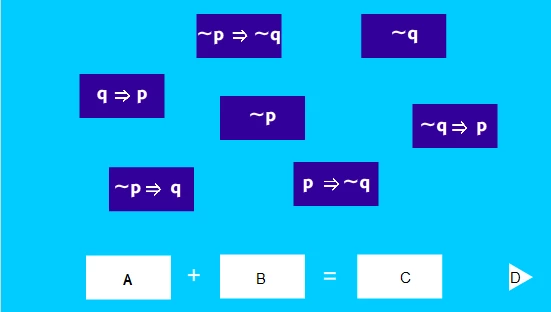
I want to hide the "nextbutton" (D button) then show (unhide) the button with some conditions, here are the conditions :

If "p=>~q" square dragged on "A" white square && "~q" square dragged on "B" white square && "~p" square dragged on "C" white square then,

Button D = visible

else

Button D = not visible

How can i do this in actionscript 3.0?

Any help would be appreciated. Thank you very much.

This topic has been closed for replies.

1 reply

kglad
Community Expert
Community Expert
December 28, 2013

if "p=>~q" name is pnotq, "~q" is notq, "~p" is notp:

if(pnotq.hitTestObject(A) && notq.hitTestObject(B) && notp.hitTestObject(C)){

D.visible=true;

} else {

D.visible=false;

}

December 29, 2013

I'm sorry, i haven't told you that i've already tried to do it with hitTestObject function, but it doesn't work, the D button never shows up even i dragged the squares on the right spot, here is some of the actionscript :

Square_4 = pnotq

Square_5 = notq

Square_1 = notp


/* Stop at This Frame

The Flash timeline will stop/pause at the frame where you insert this code.

Can also be used to stop/pause the timeline of movieclips.

*/

stop();

//Hide and Show Actionscript

if(Square_4.hitTestObject(Target_2) && Square_5.hitTestObject(Target_1) && Square_1.hitTestObject(Target_3)){

Next.visible=true;

} else {

Next.visible=false;

}

//ButtonMode Actionscript

Square_1.buttonMode = true;

Square_4.buttonMode = true;

Square_5.buttonMode = true;

//Some part of the Drag and Drop Actionscript

(I made drag and drop for all the squares (1-7))

var startX:Number;

var startY:Number;

Square_4.addEventListener(MouseEvent.MOUSE_DOWN, pickMe);

Square_4.addEventListener(MouseEvent.MOUSE_UP, dropMe);

function pickMe(event:MouseEvent):void {

    event.target.startDrag(true);

    startX = event.target.x;

    startY = event.target.y;

}

function dropMe(event:MouseEvent):void {

    event.target.stopDrag();

    var myTargetName:String = "target" + event.target.name;

    var myTarget:DisplayObject = getChildByName(myTargetName);

    if (event.target.dropTarget != null && event.target.dropTarget.parent == Target_2){

        event.target.removeEventListener(MouseEvent.MOUSE_DOWN, pickMe);

        event.target.removeEventListener(MouseEvent.MOUSE_UP, dropMe);

        event.target.buttonMode = false;

        event.target.x = Target_2.x;

        event.target.y = Target_2.y;

    } else {

        event.target.x = startX;

        event.target.y = startY;

    }

}

kglad
Community Expert
Community Expert
December 29, 2013

it would work if you used it correctly.  you're hittesting when the playhead enters that frame so unless that's after all the drops have been made, that's not going to work.

most likely you want to hittest every time a square is dropped.