


Known Participant
September 3, 2025
Question

Audio playback issues in Animate
  • September 3, 2025
  • 1 reply
  • 422 views

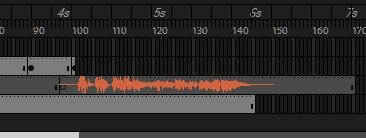
I can hear it if I test the movie and I can hear it by testing in its sound properties but I can't hear anything when I'm scrubbing or playing from the timeline.


It's an ActionScript 3, latest Animate version (24.0,10), The sync is set to "stream", the "Mute Sounds" option in the Control dropdown is disabled.


I have no Idea what's going on and I have been driving myself crazy for the last 2 hours at this point, I'm stuck, please help.


1 reply

n. tilcheff
Legend
September 3, 2025

Did you not see the thread about the same issue posted only a few hours ago?

https://community.adobe.com/t5/animate-discussions/imported-audio-has-waveform-but-nothing-plays/td-p/15488821


Nick - Character Designer and Animator, Flash user since 1998 | Member of the Flanimate Power Tools team - extensions for character animation
Known Participant
September 4, 2025

I didn't, thanks.


Uninstalling OBS or resetting windows are not viable options, are there any other troubleshooting steps I could try?

n. tilcheff
Legend
September 4, 2025

Well... read the linked threads and decide for yourself.

As far as I know drivers are not user specific, so creating a different user on your computer will not solve the issue. You may be successful by using a virtual machine for either of the incompatible programs or a separate computer.

Good luck!


Nick - Character Designer and Animator, Flash user since 1998 | Member of the Flanimate Power Tools team - extensions for character animation