Participant
May 2, 2017
Answered

Audio Still Sub-Par

  • May 2, 2017
  • 1 reply
  • 252 views

Hi there,

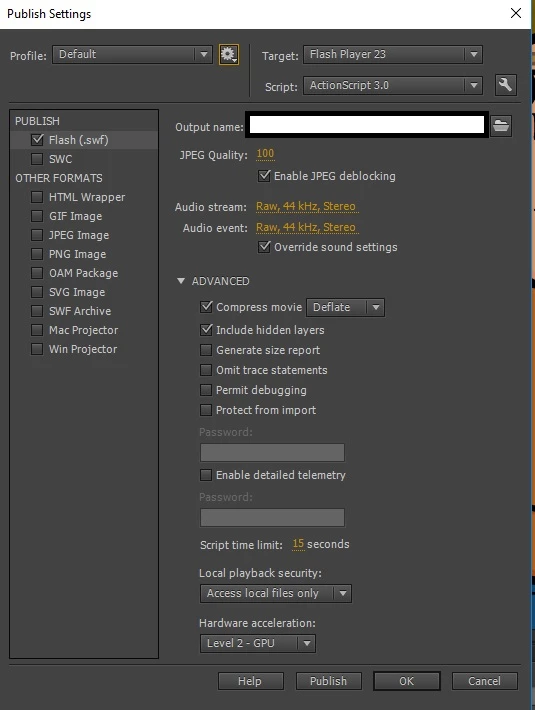
I have done some research and have gotten the sound to sound a lot better than the initial settings, but it is still not right! It sounds like it's going through a bitcrusher effect.

Even though it happens on export as well, when I preview the sound files in Animate, the quality is noticeably worse than when I open the original audio file.

Any help would be appreciated!

    This topic has been closed for replies.
    Correct answer Colin Holgate

    With ActionScript 3 FLAs scrubbing works a lot better if the sounds you imported are WAV than MP3. Also, if you imported MP3 they won't sound better when exported as Raw. If you're not importing WAV, start doing that (BTW, if you're working on HTML5 Canvas you will want MP3, not WAV).

    If you are already using WAV and are hearing a difference, check your original sounds to see if their levels are correct. Also, use your sound editor to do the conversion to 16 bit 44.1 kHz Stereo, it's likely to do a better job than Animate does. If you're happy with the 16 bit WAVs that you give to Animate, the exported Raw sound should be identical.

    1 reply

    Colin Holgate
    Colin HolgateCorrect answer
    Inspiring
    May 2, 2017

    With ActionScript 3 FLAs scrubbing works a lot better if the sounds you imported are WAV than MP3. Also, if you imported MP3 they won't sound better when exported as Raw. If you're not importing WAV, start doing that (BTW, if you're working on HTML5 Canvas you will want MP3, not WAV).

    If you are already using WAV and are hearing a difference, check your original sounds to see if their levels are correct. Also, use your sound editor to do the conversion to 16 bit 44.1 kHz Stereo, it's likely to do a better job than Animate does. If you're happy with the 16 bit WAVs that you give to Animate, the exported Raw sound should be identical.

    Participant
    May 2, 2017

    Colin, thanks heaps! The issue was I was importing 24-bit .wavs at 48000hz. I used Adobe Media Encoder to encode them to 16 bit wavs with a sample rate of 44.1khz.

    The sound quality is much better now - the audio preview in Animate is perfect. However, there is a slight bit of crackle in the exported .swf. If I can fix this issue, I'll be good to go!

    Colin Holgate
    Inspiring
    May 2, 2017

    Your swf settings were correct, are you still using Raw? Are your sounds set to Stream in the timeline?

    As a point of interest, I think that Animate misreads 24 bit as 8 bit, which is why it would be so bad.