Known Participant
June 16, 2010
Answered

Automatically editing the size and having a flowing order for dynamic text boxes

  • June 16, 2010
  • 1 reply
  • 482 views

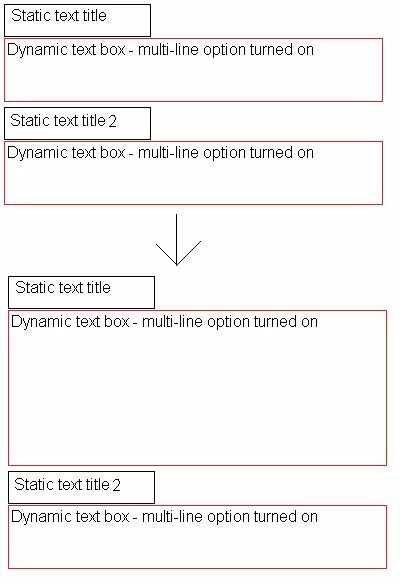
I am inputting text from an xml file into dynamic text boxes; I have static text boxes as titles of each.

I need help with making the dynamic text boxes expand if the xml text is of a larger size & moving the static text boxes so they don't start getting over written.

The code I’ve used to put the text into the dynamic boxes is very simple:

var xmlData:XML = new XML ();
var theURL_ur:URLRequest = new URLRequest("xml.xml");
var loader_ul:URLLoader = new URLLoader(theURL_ur);
loader_ul.addEventListener("complete", fileLoaded);

function fileLoaded(e:Event):void
{
   xmlData = XML(loader_ul.data);

   Dummy_txt.text = xmlData.record1.Dummy;
   Dummy_txt2.text = xmlData.record1.Dummy2;
}

E.g.
 

This topic has been closed for replies.
Correct answer

You need to set the autoSize property of your dynamic text boxes, so they will expand if necessary:

myTextField.autoSize = TextFieldAutoSize.LEFT;

Then you can use the textHeight property of the field to get the text height in pixels and move the other fields accordingly:

staticTitle2.y = dynamicText1.y + dynamicText1.textHeight + 10;

1 reply

Correct answer
June 16, 2010

You need to set the autoSize property of your dynamic text boxes, so they will expand if necessary:

myTextField.autoSize = TextFieldAutoSize.LEFT;

Then you can use the textHeight property of the field to get the text height in pixels and move the other fields accordingly:

staticTitle2.y = dynamicText1.y + dynamicText1.textHeight + 10;

nutinmAuthor
Known Participant
June 16, 2010

Thats great. Thanks