Participating Frequently
February 9, 2022
Question

Beginner question: Adding a point to a rig

  • February 9, 2022
  • 3 replies
  • 137 views

Hi there,


I want to add a point to a bone between two points.
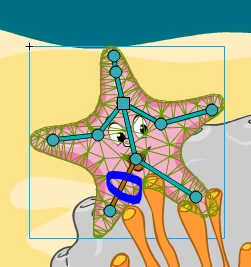


I've googled enough terms of ' add point between bones' or similar and I'm stumped.

    This topic has been closed for replies.

    3 replies

    Un23450Author
    Participating Frequently
    February 11, 2022

    Thanks very much for the info.  I guess I wonder why it's such a big deal to add a point like this?  Maybe it's a feature request?  I have messed up many times not putting 'enough' points in the middle....

    _keyframer
    Community Expert
    Community Expert
    February 10, 2022

    I think Mario is correct - delete a point and re-add as many as you need. Also, sidenote but maybe more importantly, have a BACKUP of your artwork BEFORE applying the bones with the Warped Asset tool. Once you click to start adding bones, the artwork become locked in a Warped Asset container. You can never edit the artwork ever again. In preferences > Drawing, there's a checkbox to retain your art as vectors when using this tool. It's good to know it exists and difficult to find if you don't know it even exists. I prefer to have my art in a FLA< then save as with new name and apply my Asset Warp bones. Because when I make any kind of mistake, I'll need to go back to the artwork again and you won't be able to unless you made a backup.

    Animator and content creator for Animate CC
    Mario_CR
    Community Expert
    Community Expert
    February 10, 2022

    I don't think you can, you have to remove the point with the Delete key and add two.