
Participant
September 17, 2021
Question

Best way to animate this "complex" circular menu

  • September 17, 2021
  • 1 reply
  • 162 views

Hi,

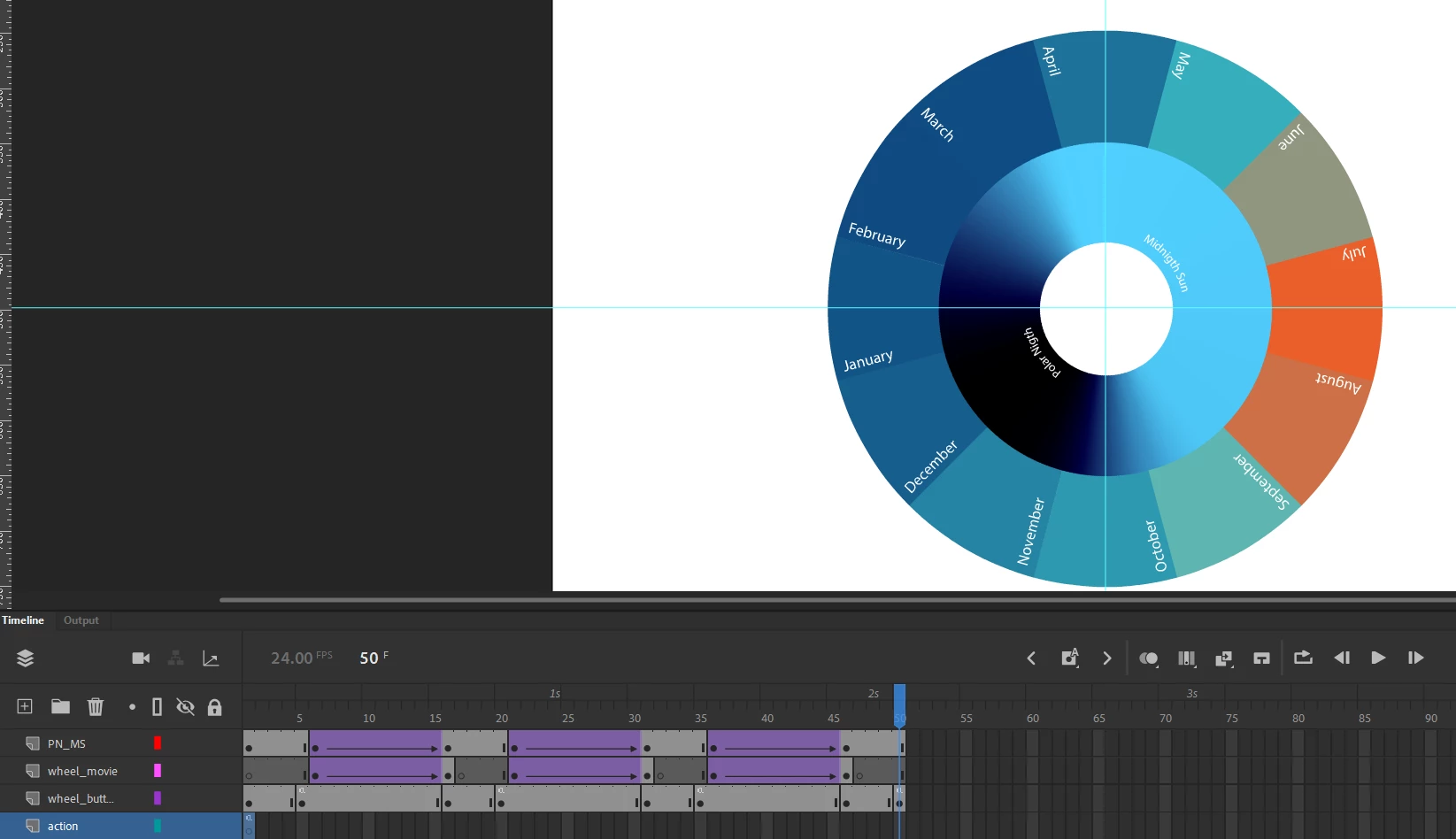
I've design the seasonal wheel, where each month is a button. Goal here is to be able to navigate it, click on a month, wheel spins to that month and stops. 


How I tried to do it now, is that the first 5 frames loop, clicking on a month say February, jumps and plays the animation at frame 5. Which is just an animation that rotates the wheel from January Position to February Position.


Since I could not animate the buttons themselves, I had to turn them into a Movie Clip object and animate that. And the 3 tween animations seen on the timeline is January -> Februrary, January -> March and January -> April.


I could repeat this for all 12 months, but it would not look so nice as the animation always starts at January, and if  I had to add animations to every path a month could take, it would be 144 of these parts.


So, my question then is. Is it possible to instead do this via action script? By creating variables for the rotation values, that will change depending on the month you are on and month you want to travell to?


Hopefully my problem is understandable.
 

This topic has been closed for replies.

1 reply

JoãoCésar17023019
Community Expert
Community Expert
September 17, 2021

Hi.


I'm not sure if this is exactly what you want, but here is a sample that I hope will get you started:


AS3 code:

import fl.motion.easing.*;
import fl.transitions.Tween;
import flash.events.MouseEvent;
import flash.display.MovieClip;
import flash.display.DisplayObject;
import fl.transitions.TweenEvent;
import flash.display.SimpleButton;
import flash.display.Sprite;

function spinMenu(e:MouseEvent):void
{
	var index:uint = (e.currentTarget as MovieClip).getChildIndex(e.target as DisplayObject);
	var tween = new Tween(e.currentTarget, "rotation", Sine.easeInOut, e.currentTarget.rotation, -30 * index, 0.5, true);
	
	tween.addEventListener(TweenEvent.MOTION_CHANGE, motionChange);
}

function motionChange(e:TweenEvent):void
{
	var i:uint;
	
	for (i = 0; i < menu.numChildren; i++)
	{
		var button:SimpleButton = menu.getChildAt(i) as SimpleButton;
		var upState:Sprite = button.upState as Sprite;
		var overState:Sprite = button.overState as Sprite;
		var downState:Sprite = button.downState as Sprite;
		
		(upState.getChildAt(1) as DisplayObject).rotation = -menu.rotation;
		(overState.getChildAt(1) as DisplayObject).rotation = -menu.rotation;
		(downState.getChildAt(1) as DisplayObject).rotation = -menu.rotation;
	}
}

menu.addEventListener(MouseEvent.CLICK, spinMenu);


FLA / code / source / files:

https://github.com/joao-cesar/adobe/tree/master/animate%20cc/as3/circular_menu


If you don't want to update the text fields rotation, just remove the line that adds the event listener for the motion change.


I hope this helps.


Regards,

JC