Participating Frequently
August 19, 2021
Answered

BigCommerce compatibility - how to apply to your website

  • August 19, 2021
  • 1 reply
  • 999 views

When creating anything for the web using adobe, the next step is always "send the files to your developer". 

Where can I get information on how to use the files myself?

I can't get an adobe animate html5 published file to work with my BigCommerce site. Any advice?

Let me know if you need more info 🙂

    This topic has been closed for replies.
    Correct answer kglad

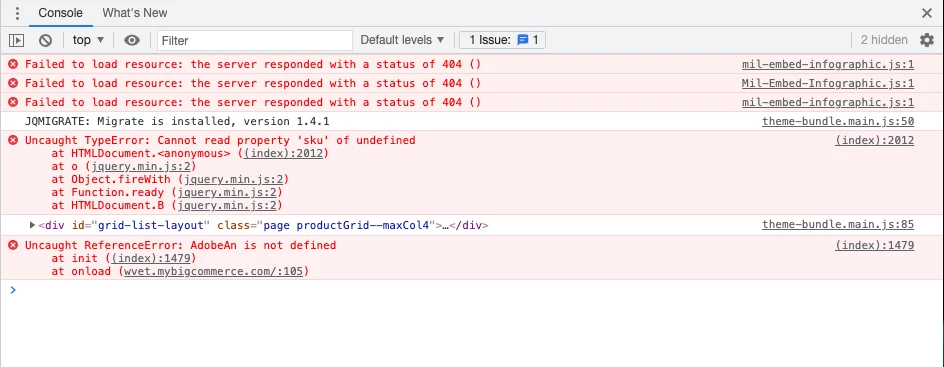
    Yes, actually I am receiving these errors. I do not know what they mean though. 😞


    you failed to upload (at least, to the correct location) 2 javascript files and you have an error in your index.html file (line 2012 and 1479).  at least, one of those html errors is because of a coding error in animate.


    i suspect when you test in animate you see that last error (AdobeAn is not defined), if not both.

    1 reply

    kglad
    Community Expert
    Community Expert
    August 20, 2021

    why can't you get an animate html5 file to work with your web site?  ie, what problem do you see?

    Participating Frequently
    August 20, 2021

    Hello! The blank space you see on this page: https://wvet.mybigcommerce.com/mil-embedded-solutions/

    That is supposed to be my interactive graphic, I animated with hover effects and click to weblinks (all working when you test it through animate). 

    I used this tutorial (https://youtu.be/ZdbudxV3bYI) and placed the code as directed by going to the theme files of my site and adding in the <head> and the <body> that way. Then I placed the <div> content on the page builder of the site for this particular page in the location where you will see the big blank space. The images for the file are uploaded in the BigCommerce image manager, and also using cyberduck so that I could maintain the path images>filename.

    At first I tried just placing the html coding in the page builder (with the js file uploaded in the theme files). This did not work either.

    Let me know if I can clarify anything or provide further detail.

    Thanks!!!

    kglad
    Community Expert
    Community Expert
    August 21, 2021

    you need to upload all the files published by animate.