


November 21, 2018
Answered

Bitmap in Button causes Error

  • November 21, 2018
  • 2 replies
  • 5108 views

So, I read about this problem a few times. I imported an Image and converted it into a button. Then this Error appears: "Content with both Bitmaps and Buttons may generate local security errors in some browsers if run from the local file system."

In Firefox everything works, but in Chrome and Safari it doesn't. I read that this can be fixed by using a local web server. The problem is that I can't do this because it is a project for university and I'm supposed so just hand in a html file.
But what can I do? I tried to put a button over my Image, made it invisible and used it for my functions. But i need something that I can convert to a button. I tried text or a shape but the same error appears.

This topic has been closed for replies.
Correct answer JoãoCésar17023019

Hi.

This warning appears sometimes but things don't necessarily stop working.

Once someone reported here a problem like yours here and the solution was to extend the bitmap until the "Hit" frame (or event creating a keyframe) inside of the button timeline. The important here is to fill up the "Hit" frame with a display object.

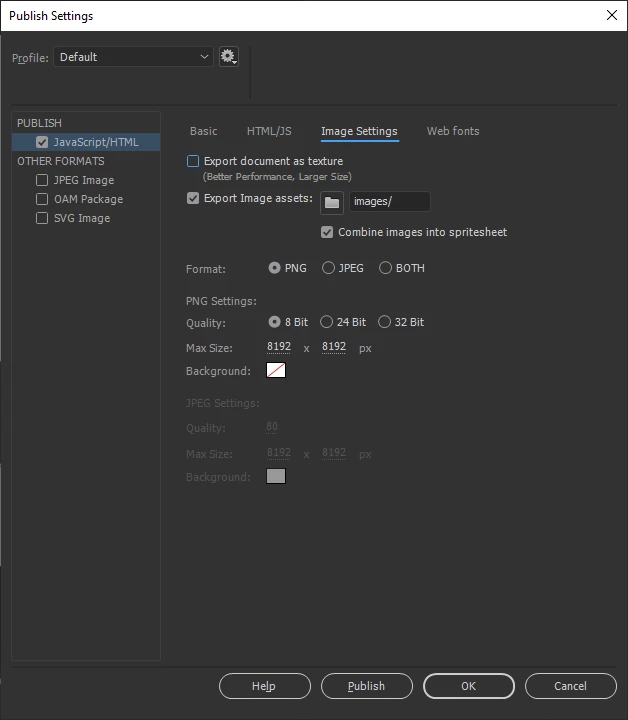
But, if you're using the 2019 version, the best you can do is to use vector shapes in your buttons and go to the Publish Settings > Image Settings and uncheck "Export document as texture" so the vector shapes will  be preserved and you won't have to deal with this security issue.

Please tell us if at least one of these tips works.

Regards,

JC

2 replies

Participant
September 10, 2020

Thank you very much for your solution, it is easy , working and very helpful

JoãoCésar17023019
Community Expert
JoãoCésar17023019Community ExpertCorrect answer
Community Expert
November 22, 2018

Hi.

This warning appears sometimes but things don't necessarily stop working.

Once someone reported here a problem like yours here and the solution was to extend the bitmap until the "Hit" frame (or event creating a keyframe) inside of the button timeline. The important here is to fill up the "Hit" frame with a display object.

But, if you're using the 2019 version, the best you can do is to use vector shapes in your buttons and go to the Publish Settings > Image Settings and uncheck "Export document as texture" so the vector shapes will  be preserved and you won't have to deal with this security issue.

Please tell us if at least one of these tips works.

Regards,

JC

November 22, 2018

Hi, thank you really much for your answer!
I'm using Animate 2018 and I have already unchecked the "Export document as texture" button. I don't really get the first thing you suggested to be honest. I'm quite new to Animate CC and I'm using it in german. I know what you mean bei "Hit" frame but I never used that, so I don't quite know what to do now. Could you maybe include a screenshot of what I'm supposed to do? That would really help.

JoãoCésar17023019
Community Expert
Community Expert
November 22, 2018

Sure.

Please take a look:

One correction I have to make is that the hit frame must be filled with a shape and not with a bitmap as I stated above.

I created a working sample for you. Notice how I structured everything and the values I used in the Publish Settings.

FLA download:

animate_cc_html5_canvas_bitmap_button_problem.zip - Google Drive

Regards,

JC