
Inspiring
July 31, 2019
Answered

Black line appears on pasted copy.

  • July 31, 2019
  • 2 replies
  • 1089 views

Hallo.

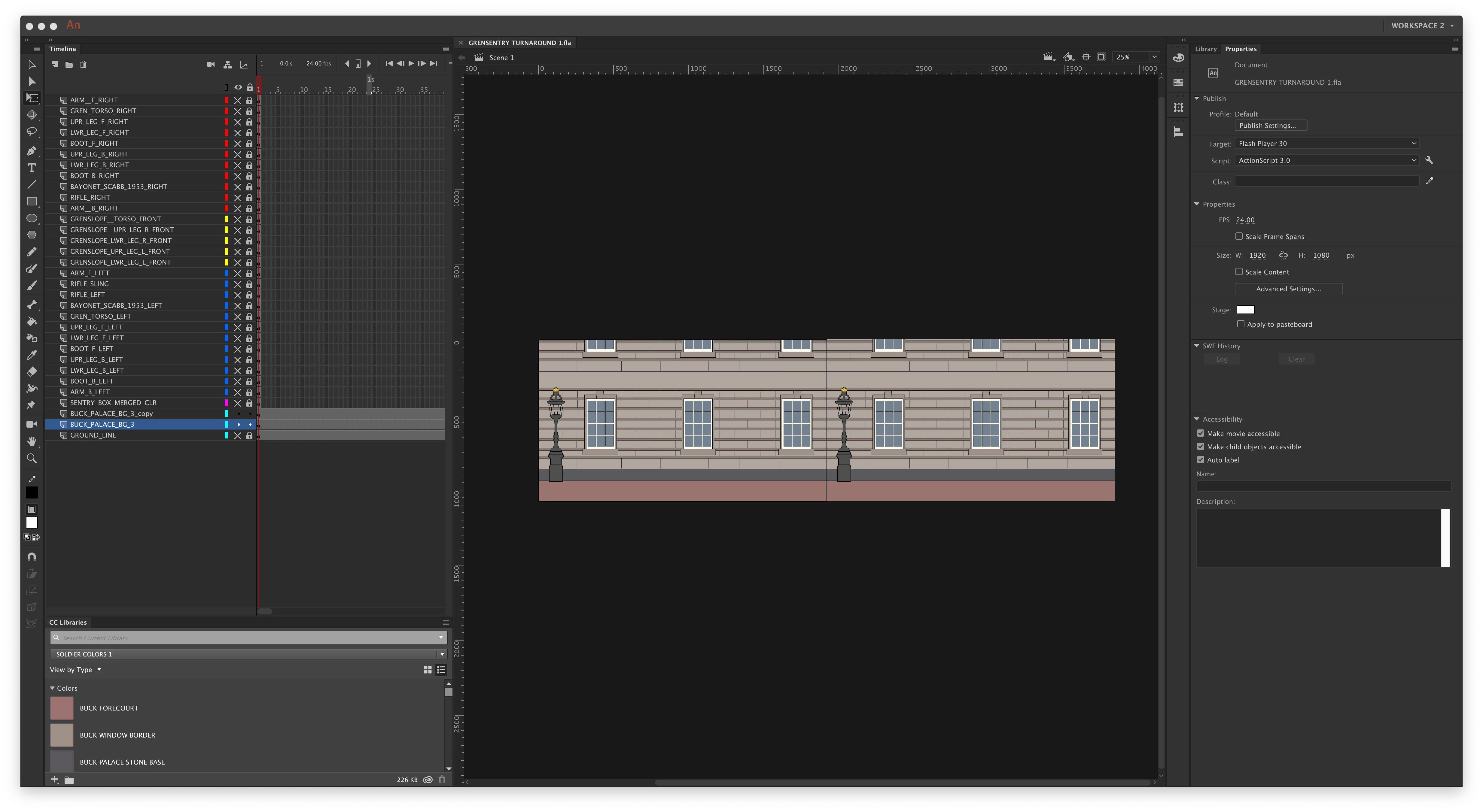
I have created in Photoshop a background which I then imported into Animate CC as a background for a character walk cycle. When I duplicate the background layer and join the duplicate background layer to the original background layer, a vertical black line appears between the joined layers, even though there is no line/stroke on the original drawing in Photoshop, and there does not appear to be one on the original image imported into animate. Can anyone tell me why a black line appears between the connected layers.? Thanks for any tips, I have enclosed a screenshot showing the vertical black line between the two images.
This topic is closed to new replies. Start a new post to keep the conversation going.
Correct answer Lars Laborious

Could it be that the black line you see is just the "stage border" in Animate. If so, it will not show up when you publish.

2 replies

JoãoCésar17023019
Community Expert
Community Expert
July 31, 2019

Hi.

Like Lars said, that's the Stage border.

You can hide it by going to Animate > Preferences (Mac) or Edit > Preferences (Windows) and in the General tab check Hide Stage border.

Regards,

JC

Lars Laborious
Lars LaboriousCorrect answer
Legend
July 31, 2019

Could it be that the black line you see is just the "stage border" in Animate. If so, it will not show up when you publish.