Participant
June 22, 2021
Answered

Blenden in Animate erstellen

  • June 22, 2021
  • 1 reply
  • 408 views

Hi! Vorweg: Ich hab gerade erst gestartet mit Animate und hoffe, ihr könnt mir vielleicht bei meinem Problem helfen.


Ich bin gerade dabei eine Animation zu erstellen, bei der meine Zeichnung am Anfang eingeblendet und am Ende ausgeblendet werden soll. Der Hintergrund bleibt also so, wie er ist, nur die Zeichnung soll eingeblendet werden (von transparent zu sichtbar quasi). Weiß jemand von euch, wie man das macht? Ist bestimmt ne einfache Lösung, ich bin aber nach Stunden leider nicht fündig geworden...

GaLiGrü

    This topic has been closed for replies.
    Correct answer JoãoCésar17023019

    Hi.


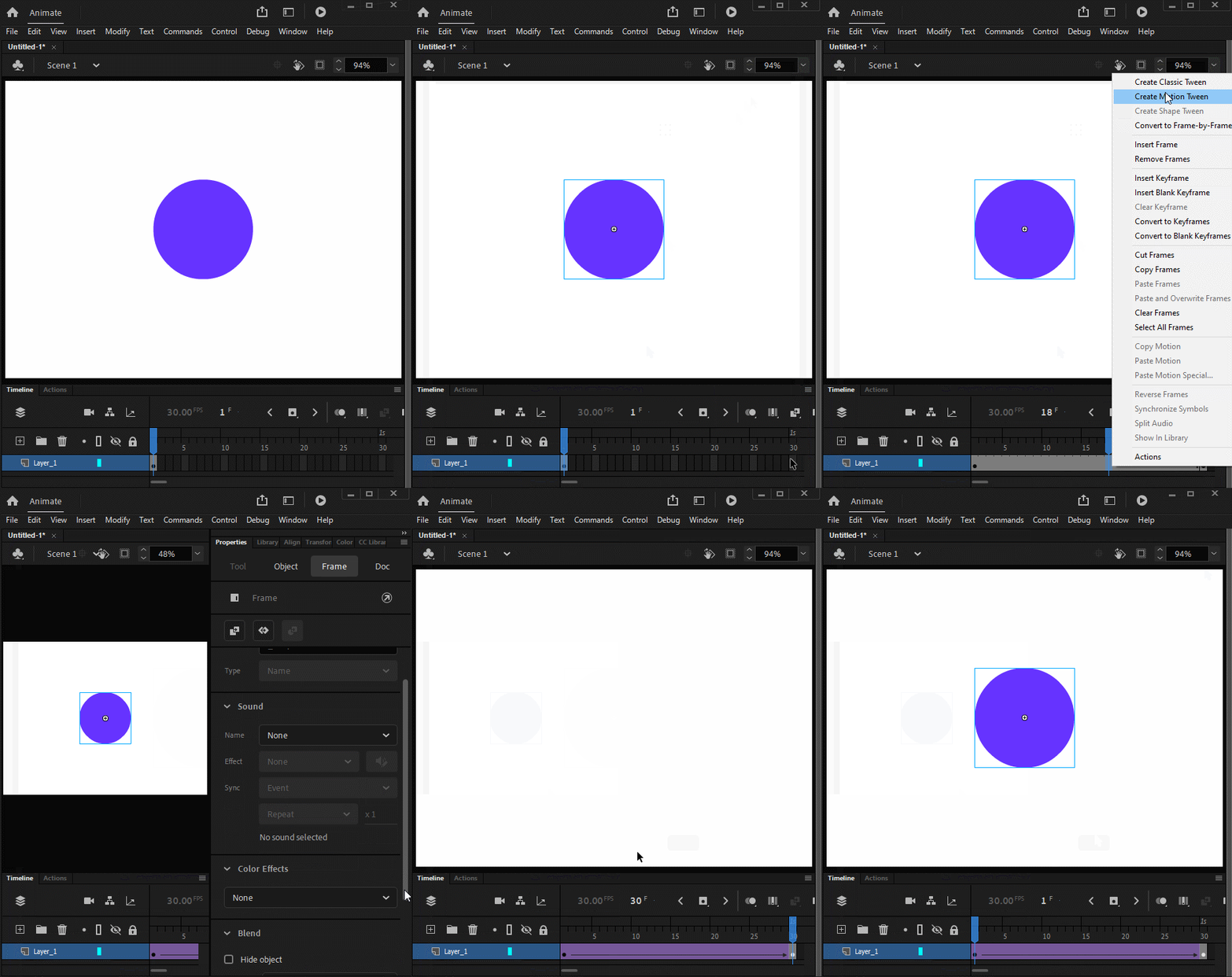
    You can achieve this effect by using a tween.


    1 - Select the drawing;

    2 - Press F8 to convert it to a Symbol;

    3 - Choose Graphic or Movie Clip;

    4 - Go to the main timeline and choose say frame 30 and press F6 to create a keyframe;

    5 - Click in any space between the two keyframes and choose Create Classic Tween;

    6 - Select the Symbol instance in frame 30;

    7 - Go to the Properties panel and under the Color Effects section choose Alpha from the dropdown menu;

    8 - Set the alpha to 0;

    9 - Play your animation.


    You can find more info in the links below:

    https://helpx.adobe.com/animate/using/classic-tween-animation.html

    https://helpx.adobe.com/animate/using/visual-glossary.html


    Regards,

    JC


    1 reply

    JoãoCésar17023019
    Community Expert
    JoãoCésar17023019Community ExpertCorrect answer
    Community Expert
    June 22, 2021

    Hi.


    You can achieve this effect by using a tween.


    1 - Select the drawing;

    2 - Press F8 to convert it to a Symbol;

    3 - Choose Graphic or Movie Clip;

    4 - Go to the main timeline and choose say frame 30 and press F6 to create a keyframe;

    5 - Click in any space between the two keyframes and choose Create Classic Tween;

    6 - Select the Symbol instance in frame 30;

    7 - Go to the Properties panel and under the Color Effects section choose Alpha from the dropdown menu;

    8 - Set the alpha to 0;

    9 - Play your animation.


    You can find more info in the links below:

    https://helpx.adobe.com/animate/using/classic-tween-animation.html

    https://helpx.adobe.com/animate/using/visual-glossary.html


    Regards,

    JC


    Participant
    June 22, 2021

    It worked! Thank you so much! 🙂

    JoãoCésar17023019
    Community Expert
    Community Expert
    June 22, 2021

    Excellent! You're welcome!