Participant
July 4, 2023
Answered

boiler extension not compatible with animate 23.0.2

  • July 4, 2023
  • 1 reply
  • 1029 views

Hi! Why isn't the boiler plugin compatible with adobe animate version 23.0.2? it says it is only compatible with animate 1.0 - 19.99. is there another plugin that would give me the same 'tremor effect' that the boiler plugin does?

Correct answer n. tilcheff

It works fine in AA23.0.2. I just tested it.


It's only a little SWF panel with a couple of JSFL scripts.


Grab the ZIP from here: 

https://drive.google.com/file/d/1UaaHCq2LLOtXIvlUFTfYb_crm88P93bj/view?usp=drive_link

Unzip and put all the files into the WindowSWF folder which is located inside Config.

Do this while Animate is closed.


Config is here:


Win: 

C:\Users\YourUserName\AppData\Local\Adobe\Animate YourVersion\YourLocale\Configuration


Mac: 

HD\Users\YourUserName\Library\Application Support\Adobe\Animate YourVersion\YourLocale\Configuration


Should look like this:
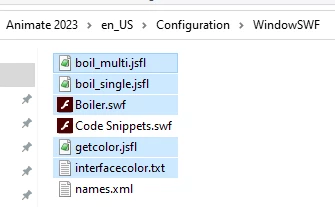
 

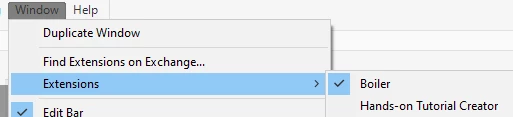
Start Animate and open Boiler from Window > Extensions
 

1 reply

n. tilcheff
Legend
July 4, 2023

It most likely is compatible. I can't think of a reason for it to be incompatible with AA23.

Just ignore the 19.99 note and try to install it.


Nick - Character Designer and Animator, Flash user since 1998 | Member of the Flanimate Power Tools team - extensions for character animation
Participant
July 4, 2023

I have it installed already. I tried to open it today and it didn't work and I saw this message when I clicked to manage it. My animate app is up to date

n. tilcheff
n. tilcheffCorrect answer
Legend
July 4, 2023

It works fine in AA23.0.2. I just tested it.


It's only a little SWF panel with a couple of JSFL scripts.


Grab the ZIP from here: 

https://drive.google.com/file/d/1UaaHCq2LLOtXIvlUFTfYb_crm88P93bj/view?usp=drive_link

Unzip and put all the files into the WindowSWF folder which is located inside Config.

Do this while Animate is closed.


Config is here:


Win: 

C:\Users\YourUserName\AppData\Local\Adobe\Animate YourVersion\YourLocale\Configuration


Mac: 

HD\Users\YourUserName\Library\Application Support\Adobe\Animate YourVersion\YourLocale\Configuration


Should look like this:


Start Animate and open Boiler from Window > Extensions

 

Nick - Character Designer and Animator, Flash user since 1998 | Member of the Flanimate Power Tools team - extensions for character animation