
Participant
April 1, 2024
Answered

Brush Lag in huion tablet

  • April 1, 2024
  • 3 replies
  • 7751 views

Every time I want to animate on my tablet the cursor lags, I can animate but it is annoying that every 10 seconds my cursor freezes, I thought it was my tablet but in other programs, it works fine! How can I fix this? 
    Correct answer active_Flutter0101

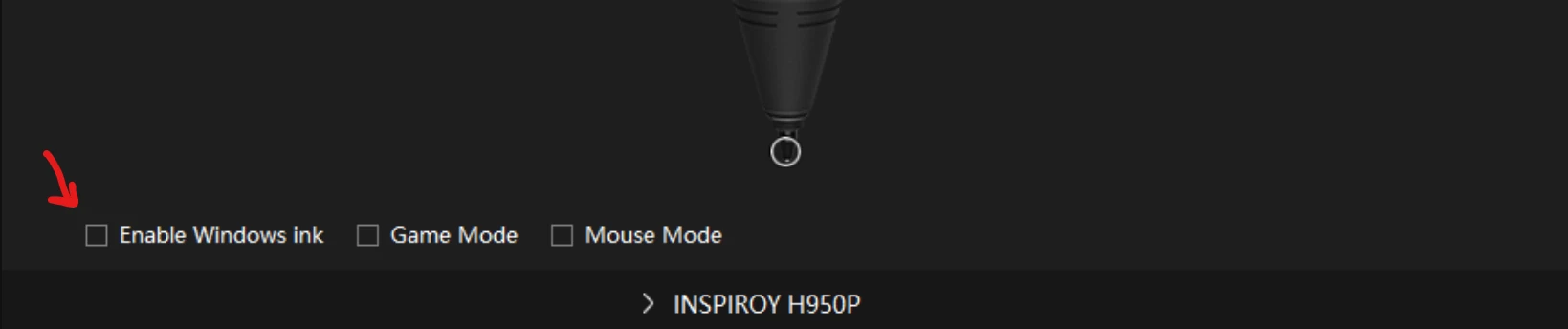
    Found a solution that worked for me. Simply uncheck the "Enable windows ink" option under the Digital pen tab in your Huion Tablet app.

    3 replies

    Participant
    April 19, 2024

    I have the same issue with a Huion Kamvas 19. I've updated the drivers, tried all these 'windows ink' options and nothing fixes it. No idea what to do.

    Participant
    April 19, 2024

    Actually, scratch that. Yes, changing the settings from windows ink to wintab WITHIN the software prefs itself (not just the driver) seemed to do it. SO confusing!

    active_Flutter0101Correct answer
    Participant
    April 14, 2024

    Found a solution that worked for me. Simply uncheck the "Enable windows ink" option under the Digital pen tab in your Huion Tablet app.

    Participant
    September 12, 2024

    THANK YOU. i've tried every tricks. Only this one works.

    Mario_CR
    Community Expert
    Community Expert
    April 1, 2024

    Hi, look up your tablet model and update the drivers to the latest ones available in Huion's website.

    Participant
    April 1, 2024

    I already do that, It doesn't work. In others apps I have works fine but when I go to the cloud all my cursor go really laggy

    Mario_CR
    Community Expert
    Community Expert
    April 2, 2024

    Another thing you can do is go to Edit > Preferences > Tablet input and switch from Windows Ink to Wintab. The Wintab API works better with some tablets, make sure to turn off Windows Ink in your tablet drivers as well.