
Participant
May 20, 2018
Question

Brush tool stroke starts with straight line

  • May 20, 2018
  • 2 replies
  • 2858 views

I've recently installed animate cc and have been trying to learn the program, but whenever I try to draw a curved line, it creates a straight line at the beginning of the stroke.
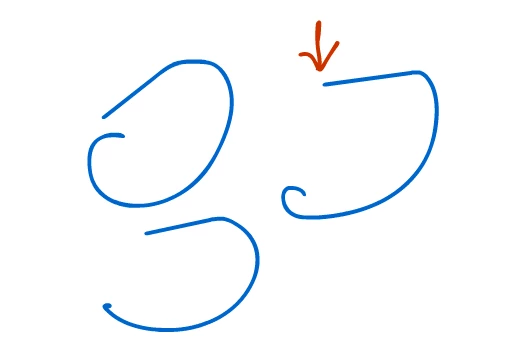
I use a wacom intuos small tablet on windows 10. I have already tried updating windows and updating the wacom drivers to the most recent update as well as uninstalling and reinstalling Animate CC.

This topic has been closed for replies.

2 replies

Starstik
Participant
December 23, 2018

Hi.

Y'know, I had the exact same problem but with the Huion Kamvas GT-220.

I managed to fix the issue by unchecking the box next to Enable Windows Ink in its settings.

After I unticked the box, the issue of having those annoying straight lines vanished.

I think it had something to do with a conflicting signal between the ANCC and Windows Ink software - my pen couldn't make up its mind!

Hope you managed to fix your issue - happy drawing!

Participant
May 24, 2021

Thank You! This worked for me, finally! For me with the Huion Kamvas Pro 16, it is under the pen settings inside the Huion Tablet app.

Preran
Community Manager
Community Manager
May 22, 2018

I checked with my colleagues, and they suggest you try the following:

  1. Uninstall and reinstall Wacom Drivers
  2. Restart your computer
  3. Set Windows Res to 100%
  4. Restart your computer.

Let me know if that helped.

Thanks,

Preran

Sketchy Kay
Participant
September 12, 2020

Hi, I'm also having this problem in 2020 and tried all the steps you listed and I still have the same problem. I use a Ugee tablet and windows. 


What do you suggest I do?