
Participant
April 15, 2017
Answered

Brush tool width (a desperate plea)

  • April 15, 2017
  • 3 replies
  • 542 views

hi, all I want to do is change the width of the brush tool AFTER I've drawn something, like you can do with the pencil tool. When I try to do it I will select whatever it is I've drawn that needs to be changed, but when I go to the properties to change the width the Brush size section within properties which has the width meter has vanished. Please PLEASE help.
    This topic has been closed for replies.
    Correct answer Nick Gioia

    There are 2 brush tools.

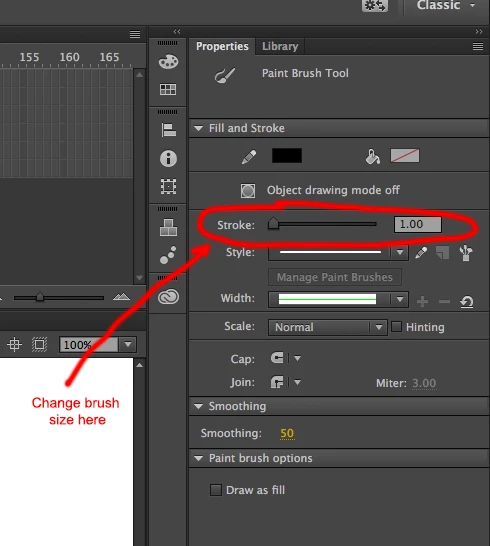
    If you are using the Paint Brush tool you have to change the width of the brush in the properties panel.

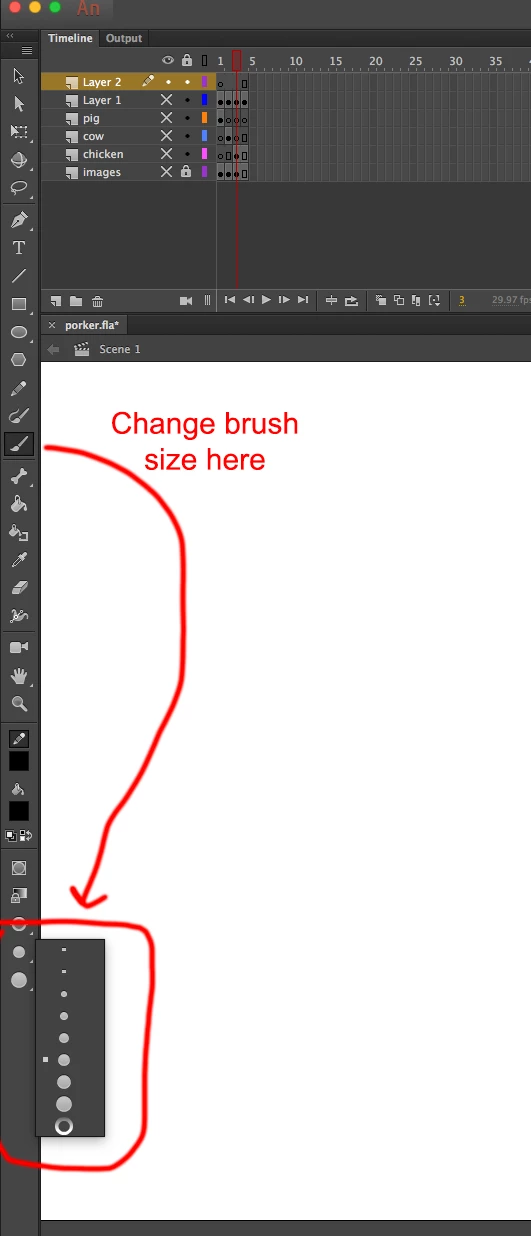
    If you are using the brush tool you will have to change the size in toolbar panel. Also when using the tool brush you can change the brush size with keyboard shortcuts. keyboard shortcuts are [ for smaller ] for bigger.

    3 replies

    travisbrainerd
    Participating Frequently
    April 17, 2017

    With the Paint Brush tool, you can change the stroke size after it's been drawn.

    Asymetrical
    Inspiring
    April 16, 2017

    You can't really do that after the fact with the standard brush tool but what MIGHT help you is to select the art with the art tool or lasso tool, copy the art, and Paste in Place (Up on the file menu select Edit>Paste in Place), then while the art is still selected move the art one pixel to the left... then paste in Place again and move that selected art one pixel to the right. Your art will appear thicker. If you need more thickness do the same up and down. It's not perfect but it works. the other thing is that if you zoom in really close you can sort of tailor how far the art moves. I hope this helps!

    Nick GioiaCommunity ExpertCorrect answer
    Community Expert
    April 15, 2017

    There are 2 brush tools.

    If you are using the Paint Brush tool you have to change the width of the brush in the properties panel.

    If you are using the brush tool you will have to change the size in toolbar panel. Also when using the tool brush you can change the brush size with keyboard shortcuts. keyboard shortcuts are [ for smaller ] for bigger.