jn24539269
Participating Frequently
August 10, 2018
Answered

Can an interactive whiteboard be made using HTML5?

  • August 10, 2018
  • 1 reply
  • 2377 views

Hello!

I have an interactive whiteboard that is very simple (it just gives you the ability to draw on a blank space).  The file was created using ActionScript 3.  I need to update the SWF file to HTML5.  I saw that there is a conversion button in Adobe Animate, but the file does not work after it has been converted to an HTML Canvas.

Does anyone know if it is possible to easily convert ActionScript to Java?  I know some programs like Swiffy are no longer available.  Also, would an interactive drawing board work in HTML5 using Adobe Animate, or am I running down a rabbit hole? (I hate to ask that question, but I'm pretty new at this).

Here is the code:

/* import flash.display.MovieClip;

import flash.events.MouseEvent;

var pen_mc:MovieClip;

var drawing:Boolean = false;

var penSize:uint = 1;

var penColor:Number = 0x000000;

function init():void{

pen_mc = new MovieClip();

stage.addEventListener(MouseEvent.MOUSE_DOWN, startDrawing);

stage.addEventListener(MouseEvent.MOUSE_MOVE, isDrawing);

stage.addEventListener(MouseEvent.MOUSE_UP, finishedDrawing);

addChild(pen_mc);

toolBox_mc.redSwatch_mc.addEventListener(MouseEvent.CLICK, function():void{

penColor = 0xFF0000;

});

toolBox_mc.greenSwatch_mc.addEventListener(MouseEvent.CLICK, function():void{

penColor = 0x00FF00;

});

toolBox_mc.blueSwatch_mc.addEventListener(MouseEvent.CLICK, function():void{

penColor = 0x0000FF;

});

toolBox_mc.penSizeTwenty_mc.addEventListener(MouseEvent.CLICK, function():void{

penSize = 20;

});

toolBox_mc.penSizeThree_mc.addEventListener(MouseEvent.CLICK, function():void{

penSize = 3;

});

toolBox_mc.penSizeOne_mc.addEventListener(MouseEvent.CLICK, function():void{

penSize = 1;

});

swapChildren(toolBox_mc, pen_mc);

}

init();

function startDrawing(e:MouseEvent):void{

trace("Pen Has started drawing");

drawing = true;

pen_mc.graphics.lineStyle(penSize, penColor, 1.0);

pen_mc.graphics.moveTo(mouseX, mouseY);

}

function isDrawing(e:MouseEvent):void{

if(drawing){

pen_mc.graphics.lineTo(mouseX, mouseY);

}

}

function finishedDrawing(e:MouseEvent):void{

trace("finished drawing");

drawing = false;

}*/

    This topic has been closed for replies.
    Correct answer JoãoCésar17023019

    Hi again.

    Sure it is.

    The code from the website won't work inside of Animate without some modifications. It's because there they're targeting objects created directly with code. In ANCC, we need to target objects created with the IDE at authortime.

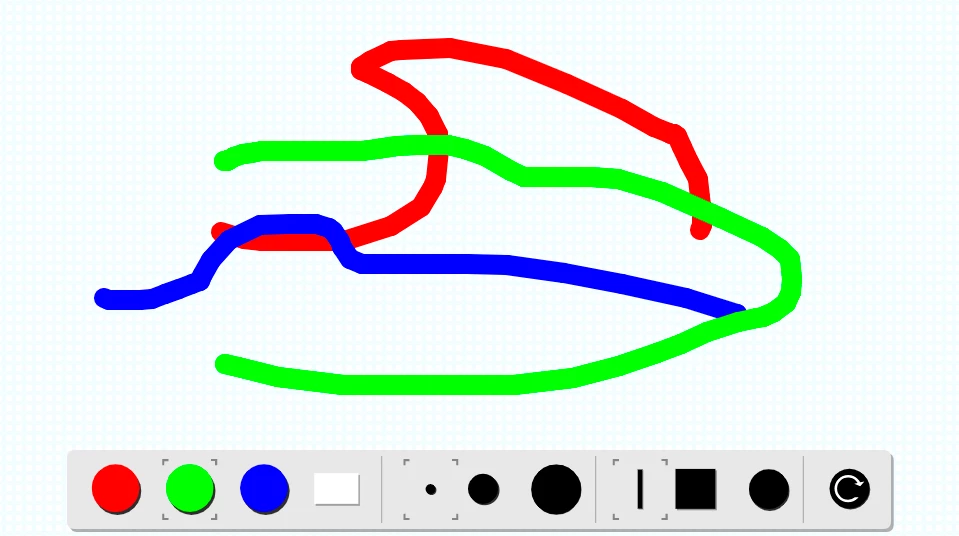
    Here is a small sample of how a drawing/painting app can be created with Animate CC.

    Preview:

    JavaScript code:

    var app = this;

    app.config =

    {

         color:"#FF0000",

         size: 20,

         shape:"round"

    };

    app.shape = null;

    app.oldX = null,

    app.oldY = null,

    app.pressed = false;

    app.erase = false;

    app.start = function()

    {

         createjs.Touch.enable(stage);

         stage.enableDOMEvents(true);

         app.reset();

         app.on("mousedown", function(e)

         {

              target = e.target;

              if (target == app.redButton)

              {

                   app.config.color = "#FF0000";

                   app.erase = false;

                   app.colorHighlight.x = target.x

              }

              else if (target == app.greenButton)

              {

                   app.config.color = "#00FF00";

                   app.erase = false;

                   app.colorHighlight.x = target.x

              }

              else if (target == app.blueButton)

              {

                   app.config.color = "#0000FF";

                   app.erase = false;

                   app.colorHighlight.x = target.x

              }

              else if (target == app.eraseButton)

              {

                   app.erase = true;

                   app.colorHighlight.x = target.x

              }

              else if (target == app.size1Button)

              {

                   app.config.size = 1;

                   app.sizeHighlight.x = target.x;

              }

              else if (target == app.size3Button)

              {

                   app.config.size = 3;

                   app.sizeHighlight.x = target.x;

              }

              else if (target == app.size20Button)

              {

                   app.config.size = 20;

                   app.sizeHighlight.x = target.x;

              }

              else if (target == app.buttButton)

              {

                   app.config.shape = "butt";

                   app.shapeHighlight.x = target.x;

              }

              else if (target == app.squareButton)

              {

                   app.config.shape = "square";

                   app.shapeHighlight.x = target.x;

              }

              else if (target == app.roundButton)

              {

                   app.config.shape = "round";

                   app.shapeHighlight.x = target.x;

              }

              else if (target == app.resetButton)

              {

                   app.reset();

              }

         });

         stage.on("stagemousedown", function(e)

         {

              app.oldX = e.stageX / stage.scaleX;

              app.oldY = e.stageY / stage.scaleY;

              app.pressed = true;

         });

         stage.on("stagemouseup", function(e)

         {

              app.pressed = false;

         });

         stage.on("stagemousemove", function(e)

         {

              var responsiveX = e.stageX / stage.scaleX;

              var responsiveY = e.stageY / stage.scaleY;

              if (app.pressed && app.oldX)

                   app.shape.graphics.beginStroke(app.config.color).setStrokeStyle(app.config.size, app.config.shape).moveTo(app.oldX, app.oldY).lineTo(responsiveX, responsiveY);

              app.oldX = responsiveX;

              app.oldY = responsiveY;

              app.board.updateCache(app.erase ? "destination-out" : "source-over");

              app.shape.graphics.clear();

         });

    };

    app.reset = function()

    {

         if (app.board.children.length > 0)

              app.board.removeChildAt(0);

         app.board.cache(0, 0, app.nominalBounds.width, app.nominalBounds.height);

         app.shape = new createjs.Shape();

         app.board.addChild(app.shape);

    };

    app.start();

    FLA download:

    animate_cc_html5_painting_app.zip - Google Drive

    Please don't hesitate to ask if you still have any further questions.

    Regards,

    JC

    1 reply

    JoãoCésar17023019
    Community Expert
    Community Expert
    August 10, 2018

    Hi.

    Although AS3 and JavaScript have similar syntaxes, they use different APIs. So there's no automatic way of converting one to another. At least not so easily.

    Animate CC is integrated with the CreateJS libraries and the CreateJS official website has a demo that is exactly what you want:

    https://createjs.com/demos/easeljs/curveto

    Please tell us what you think.

    Regards,

    JC

    jn24539269
    Participating Frequently
    August 13, 2018

    Thank you for your reply! 

    The link you provided is exactly what I'm looking for.  Is there any way to make this within Animate CC using the HTML Canvas?  I haven't been able to find a demo/tutorial online.  There are several tutorials for SWF, but none that I could find for HTML.