Participant
October 6, 2021
Question

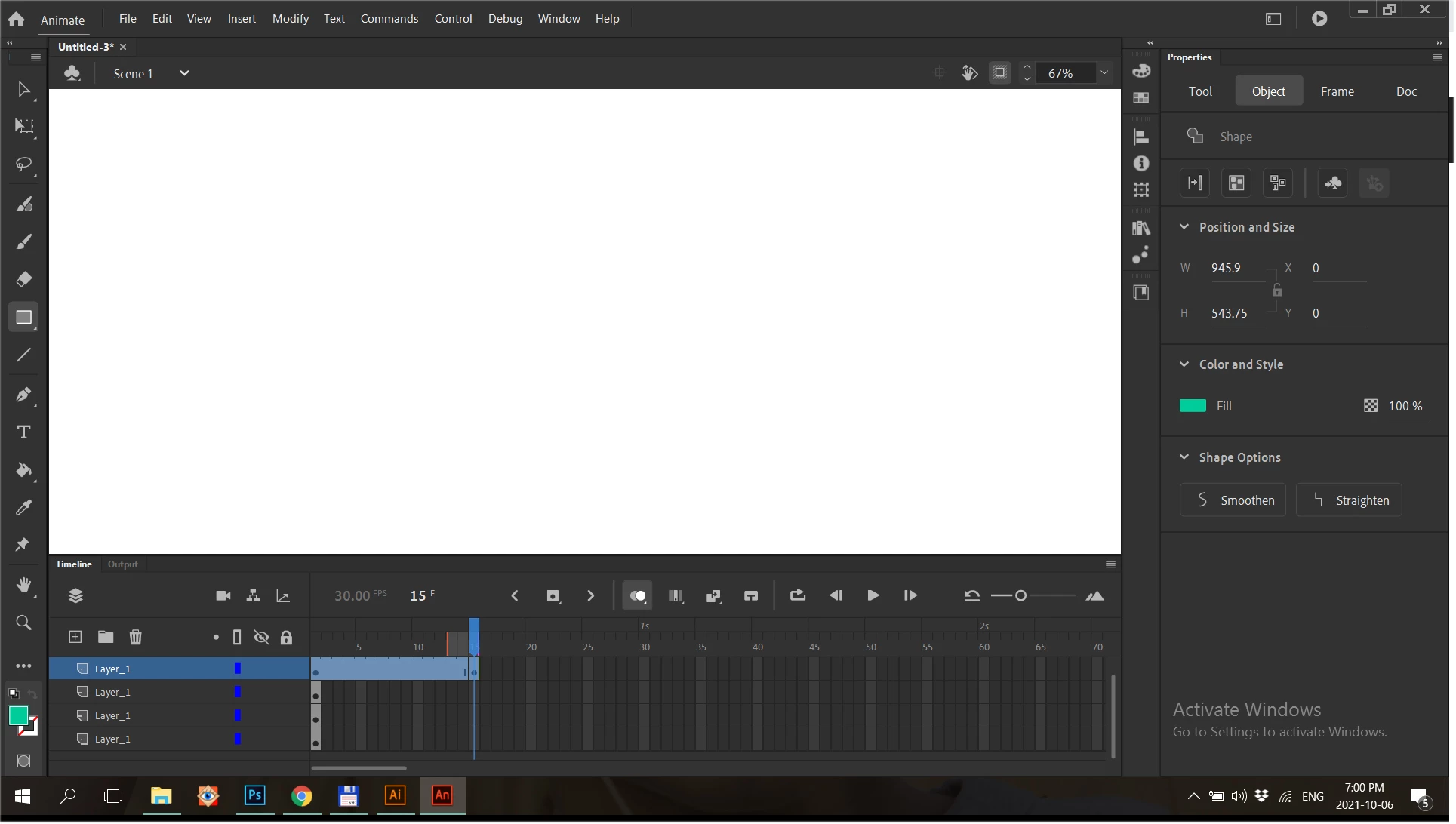
Can't draw or see anything on the workspace. Please help!

  • October 6, 2021
  • 3 replies
  • 383 views

I use the Animate for the first time, I do everything according to the guides, but I see only a white workspace. What could it be?

This topic has been closed for replies.

3 replies

_keyframer
Community Expert
Community Expert
October 14, 2021

Looking at your timline panel, you are currently on frame 15. Looks like there's several other layers with artwork on frame 1 that can't be seen from frame 15. Insert more frames on those layers so they are all equal length.

Animator and content creator for Animate CC
Inspiring
October 8, 2021

Does your computer meet the system requirements for Animate (the GPU requirement in particular)? https://helpx.adobe.com/animate/system-requirements.html

Participant
October 8, 2021

Thank you very much for your answer!!! Yes it does

kglad
Community Expert
Community Expert
October 8, 2021

then assign, at least, one custom keyboard shortcut

reset your preferences: https://helpx.adobe.com/animate/using/set-preferences.html

confirm you kb shortcut no longer works

by altering magnification and stage color, see if you can find the stage.

kglad
Community Expert
Community Expert
October 7, 2021

it could be that your content is off-stage (and you do have clip offstage content selected). deselect that.


it could be that you're looking at the back stage.


try changing the workspace (window>workspaces>...,)


try lowering your stage magnification.

Participant
October 8, 2021

Thank you very much for your answer!!! Unfortunately, my problem looks like a bug in the program, I tried to change the workspace and lowered stage magnification, but it's doesn't work.