
Jillinger
Participant
July 20, 2015
Question

Can't Get Rid of Border

  • July 20, 2015
  • 1 reply
  • 326 views

Hi

I really need help with this badly. I've been trying to get this fixed for two days now, and have not been able to, even though I have tried many suggestions for scaling in full screen.

This is what happens when this example runs in full screen.
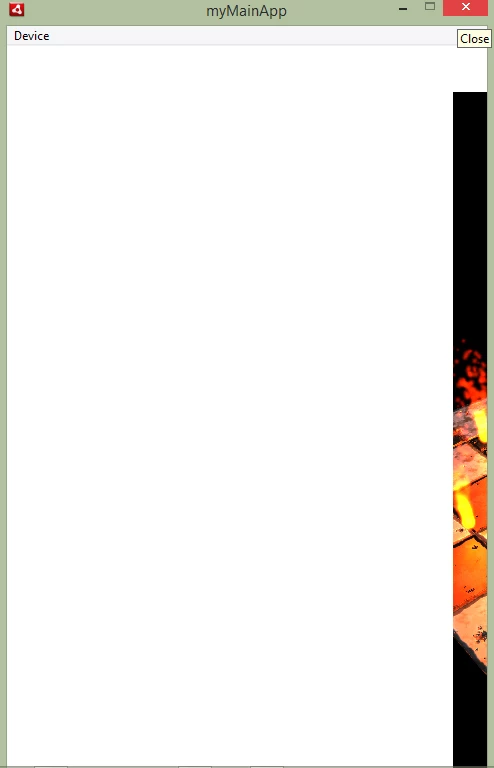
It's okay otherwise...
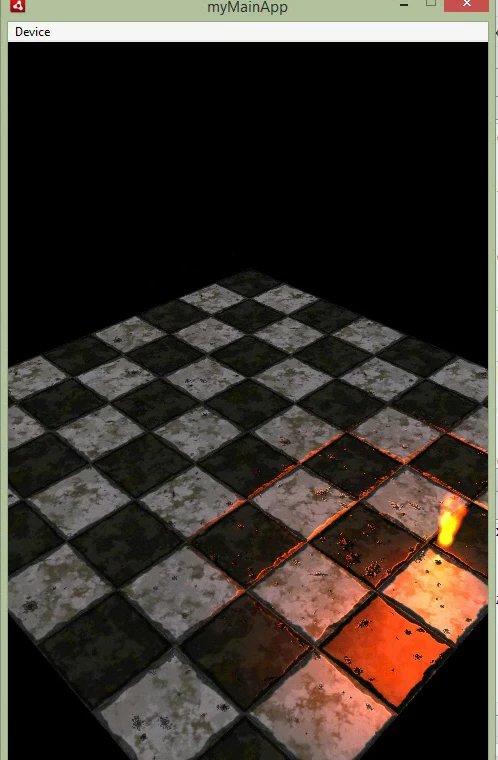
I'm not sure if this is related to the camera, or stage.

This topic has been closed for replies.

1 reply

Ned Murphy
Legend
July 20, 2015

If this is an AS3 issue then please show the code that is relevant, otherwise it will be better to post in the Flash General forum.

Jillinger
JillingerAuthor
Participant
July 20, 2015

That's a lot of code to send for just this, so instead I'll just simplify it.

If you want the example, it can be found among the many Away3d examples - away3d-examples-fp11-master at github.

Here is a simple code that produces the same results:

package
{

   import away3d.animators.*;

   import away3d.animators.data.*;

   import away3d.animators.nodes.*;

   import away3d.animators.transitions.*;

   import away3d.audio.*;

   import away3d.bounds.*;

   import away3d.cameras.*;

   import away3d.cameras.lenses.*;

   import away3d.containers.*;

   import away3d.controllers.*;

   import away3d.core.base.*;

   import away3d.core.base.SubGeometry;

   import away3d.core.pick.*;

   import away3d.debug.*;

   import away3d.entities.*;

   import away3d.events.*;

   import away3d.extrusions.Elevation;

   import away3d.filters.*;

   import away3d.lights.*;

   import away3d.loaders.*;

   import away3d.loaders.parsers.*;

   import away3d.materials.*;

   import away3d.materials.lightpickers.*;

   import away3d.materials.methods.*;

   import away3d.paths.*;

   import away3d.primitives.*;

   import away3d.textures.*;

   import away3d.tools.helpers.*;

   import away3d.utils.*;

   import flash.automation.*;

   import flash.desktop.*;

   import flash.desktop.NativeApplication;

   import flash.display.*;

   import flash.display3D.textures.*;

   import flash.events.*;

   import flash.filesystem.*;

   import flash.filters.*;

   import flash.geom.*;

   import flash.media.*;

   import flash.system.*;

   import flash.text.TextField;

   import flash.text.TextFieldAutoSize;

   import flash.text.TextFormat;

   import flash.trace.Trace;

   import flash.ui.*;

   import flash.utils.*;

   import flash.xml.*;

   /**
  * Created by John on 7/16/2015.
  */
  /*[SWF(backgroundColor="#000000", frameRate="60")]*/
   public class myMainApp extends Sprite

  {

   private static const NUM_FIRES:uint = 10;

   //private var camera:Camera3D;
   private var view:View3D;

   private var cameraController:HoverController;

   //light objects
   private var directionalLight:DirectionalLight;

   private var lightPicker:StaticLightPicker;

   /**
  * Constructor
  */
   public function myMainApp():void //:void - function does not return a value, so doesn't waste time looking for any
  /*A function that has the same name as the class is called the "constructor" function.
  Every time a new instance of this class is created, the contents of this function (basic_v4) will be executed.*/
   {

   if (stage) init(); //if stage exists - initialize
   else addEventListener(Event.ADDED_TO_STAGE, init); //otherwise watch for it
   }

   /**
  * Global initialise function
  */
   private function init(e:Event = null):void // Event = null = init(has no arguments)
   {

   removeEventListener(Event.ADDED_TO_STAGE, init); // remove
  /*stage.scaleMode = StageScaleMode.NO_SCALE;
  stage.align = StageAlign.TOP_LEFT;*/
   stage.align = StageAlign.TOP_LEFT;

   //sdX = stage.x; sdY = stage.y;

   stage.displayState = StageDisplayState.FULL_SCREEN_INTERACTIVE;

   stage.scaleMode = StageScaleMode.SHOW_ALL;

   view = new View3D();

   view.backgroundColor = 0x000000; //background - black
   addChild(view); //add view to stage

   initListeners();

  }

   /**
  * Initialise the listeners
  */
   private function initListeners():void
   {

   addEventListener(Event.ENTER_FRAME, onEnterFrame);

   stage.addEventListener(Event.RESIZE, onResize);

   onResize();

  }

   /**
  * Navigation and render loop
  */
   private function onEnterFrame(event:Event):void
   {

   view.render();

  }

   /**
  * stage listener for resize events
  */
   private function onResize(event:Event = null):void
   {

   view.width = stage.stageWidth;

   view.height = stage.stageHeight;

   /*view.x = stage.stageWidth/2 - view.width/2;
  view.y = stage.stageHeight/2 - view.height/2;*/
   }

  }

}

Jillinger
JillingerAuthor
Participant
July 21, 2015

Hi Ned, I posted the code. I really need help with this badly. Otherwise, I guess I'll have an app that cannot run in full-screen. I don't know if this might annoy some users.