Participant
Jun 8, 2018 9:42 PM UTC
Answered

Can't import videos to animate

I just downloaded the trial version of Adobe Animate as i want to learn how to create html5-banners. i have a short video clip I'm planning to use in the banner but i'm having problem importing it. The "Import video" is not "clickable" under files/import and when i click on "import to library", I just get a error message saying the file (FLV) saying it isn't able to be imported. I'm using a mac. 

This topic is closed to new replies. Start a new post to keep the conversation going.
chenjil43641795
chenjil43641795Correct answer
Legend
Jun 9, 2018 8:57 AM UTC

18 replies

Participant
Feb 24, 2021 4:40 PM UTC

I have a similar problem, I imported my video correctly but I can't see it when I test my animation on my browser. 

Do anyone have an idea? 


Translate
kglad
Community Expert
Community Expert
Feb 24, 2021 8:53 PM UTC

are you creating an html5 project?  if so, click control > test > test in browser 

Translate
Participant
Jan 21, 2021 8:28 PM UTC

I wish the video were in english

Translate
kglad
Community Expert
Community Expert
Jan 22, 2021 2:47 PM UTC

the solution is the same as my original post, import an mp4.


if you have a video (eg, flv) that you need to convert, use adobe media encoder.

Translate
Participant
Feb 9, 2022 6:33 PM UTC

Hi there,

I am having difficulty importing H264 video files into Adobe Animate and Adobe Photoshop (both 2022 versions). This has been something I have never had difficulty with previously. It is not greyed out, I am using Actionsscript 3.0 - I can select the H264 file, and when I get to finish, it just lags there and does not load a video file or let me do anything at all. Each time I have had to force quit and restart the application. I have also recently updated my OS to Monterey. I also went into System Preferences, Security and Privacy, Accesibility to allow Animate and Photoshop full disk access. Please help!

Translate
chenjil43641795
Legend
Jun 9, 2018 6:25 AM UTC

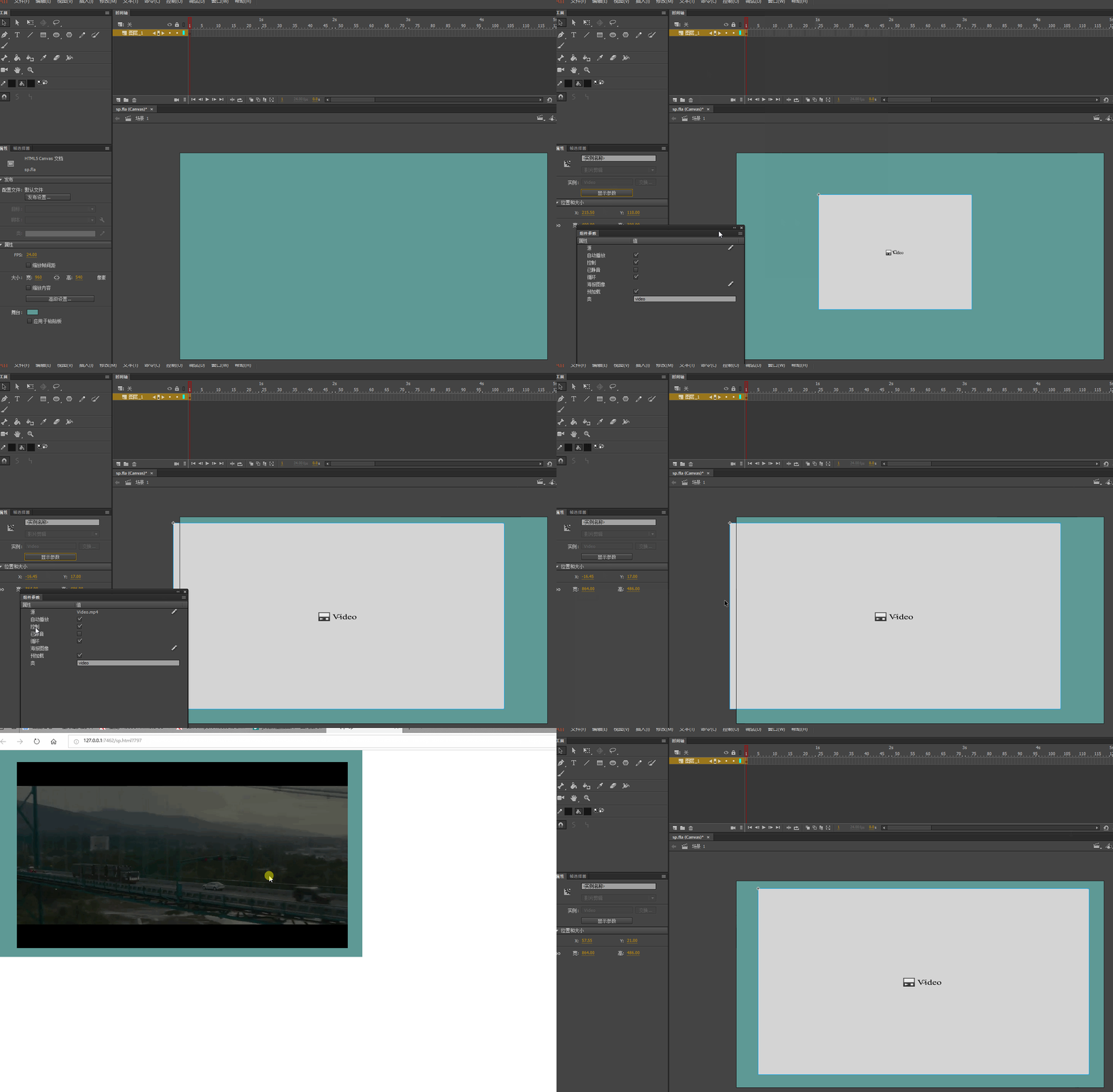
If you only need to play the video

H5 does not support direct import.

Please open the window---component

Video---Video,Double click

Window--Component parameters

Set source.

You can copy the video to a file folder.

Path Write file name only.

If you use video as a material

ANCC now not only can't import video,

And you're going to have problems importing a lot of bitmaps.

I suggest you if the video is not very big.

You can use other software to output a JPG sequence, and then import

Translate
Participant
Jun 9, 2018 8:19 AM UTC

I want to do something like this; Banner.gif​. In that gif I just imported the video in Photoshop and created a gif but it's obvs. to big/heavy to use for the platform. What kind of solution what you suggest, I'm still a newbie for stuff like this so any tips would be great!

Thanks for the help!

Translate
chenjil43641795
Legend
Jun 9, 2018 8:47 AM UTC

See demo.

By the first method, you can.

Video Too Big

You can use the Adobe Media encoder CC 2018 Conversion.

The size is set smaller.

The quality is not too high.

Format MP4

Translate
kglad
Community Expert
Community Expert
Jun 8, 2018 11:40 PM UTC

try an mp4.

Translate