


Participant
May 5, 2020
Question

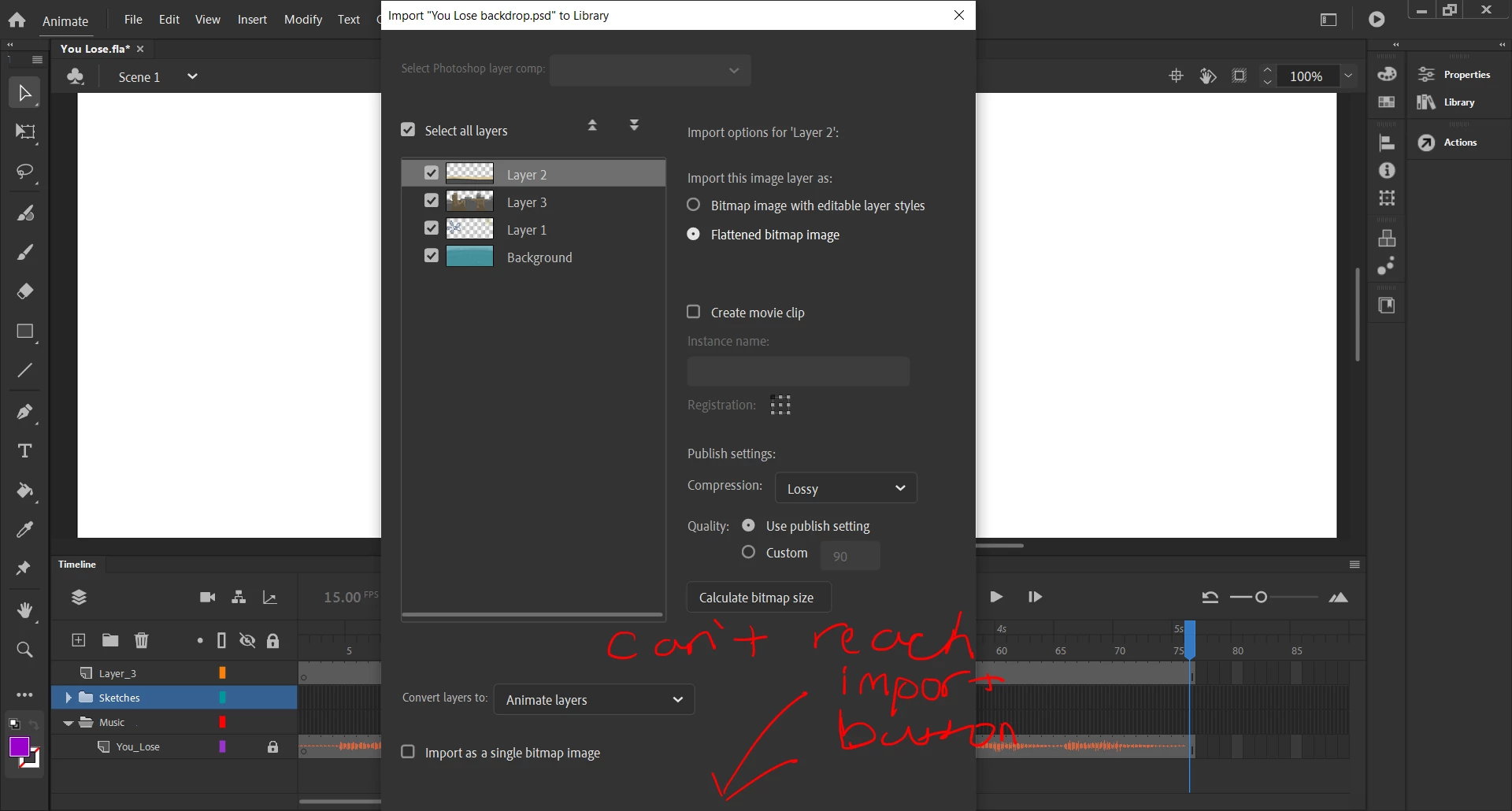
Can't reach import button

  • May 5, 2020
  • 1 reply
  • 431 views

Hello. I'm using adobe animate to make an animation. I want to import layers from Photoshop into Animate, but I can't reach the import button at the bottom of the window. I tried dragging the window upwards, but it won't let me see the rest of it. I also tried to shrink it manually, but it won't let me. Is there a way to shrink the window?
    This topic has been closed for replies.

    1 reply

    Community Expert
    May 5, 2020

    Have you tried changing your workspace?

    Participant
    May 7, 2020

    Yes, but it didn't change anything. Would pressing "enter" on my keyboard work?

    n. tilcheff
    Legend
    May 7, 2020

    Hi mate,


    There are UI issues with this version where interface elements are too large for small screens.


    Either: 

    Increase screen resolution, if you can.

    Plug in a Full HD display.

    Rotate your image 90° temporarily form video settings of your OS.

    Install Animate 2019 (19.2.1) where the issue may not be present as the UI is more compact.


    Nick - Character Designer and Animator, Flash user since 1998 | Member of the Flanimate Power Tools team - extensions for character animation