
Participating Frequently
July 5, 2022
Answered

Can't see any layers (they're set to Visible and are not in Edit mode)

  • July 5, 2022
  • 1 reply
  • 651 views

Hi,


I've somehow managed to hide all layers from the workspace.

They're not set to invisible, and none of them are in the Edit Symbols mode, but I can see them in the layers list (bottom left).

Any ideas?
    This topic has been closed for replies.
    Correct answer kglad

    Here's the link: https://bit.ly/3yPucpn


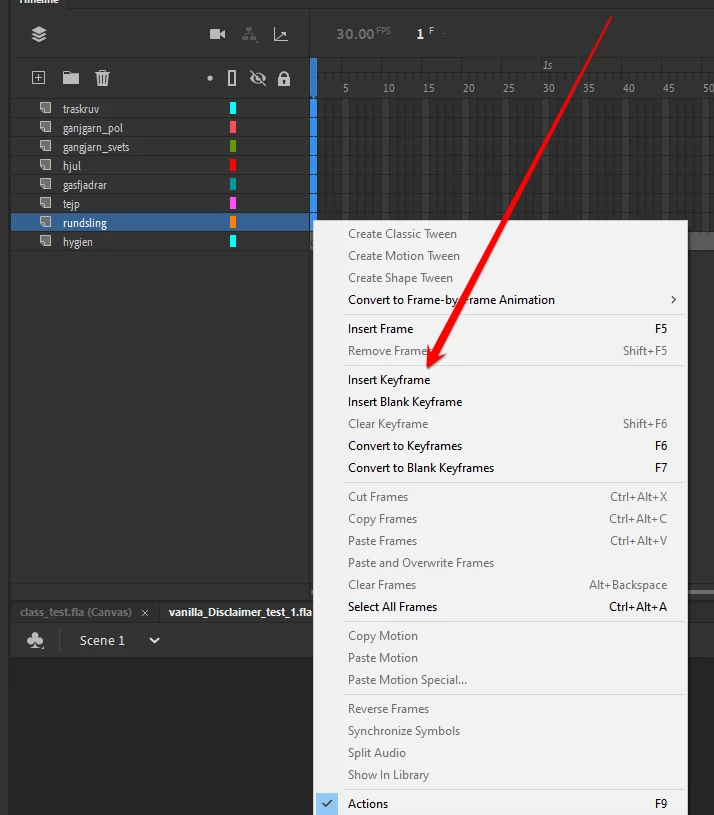
    you deleted the frame 1 keyframes in all the layers except hygien. ie, select frame 1 for the layers missing their timeline and create a new keyframe.


    p.s. interestingly (to me) i had another fla from last year with the same (imo) unusual name. do you know why that is?


    1 reply

    kglad
    Community Expert
    Community Expert
    July 5, 2022

    bottom left means nothing useful in this context because there are many workspace configurations.  an embedded screenshot would be more helpful.


    p.s. if you can't see your timeline, click window>timeline

    MagnusFAuthor
    Participating Frequently
    July 6, 2022

    I guess you're right 😅


    TheOriginalGC
    Community Expert
    Community Expert
    July 6, 2022

    Where are your keyframes?
