
Participating Frequently
May 22, 2022
Question

Can't sign into Creative Cloud Desktop App

  • May 22, 2022
  • 1 reply
  • 131 views

I'm at my wits end. I need to update Adobe Animate so I can use the Lip Sync feature, but it seems this is only doable through the Creative Cloud desktop app, and it never prompts me for my password. I enter my account email, the little green checkmark comes up, and then nothing happens. It freezes. 
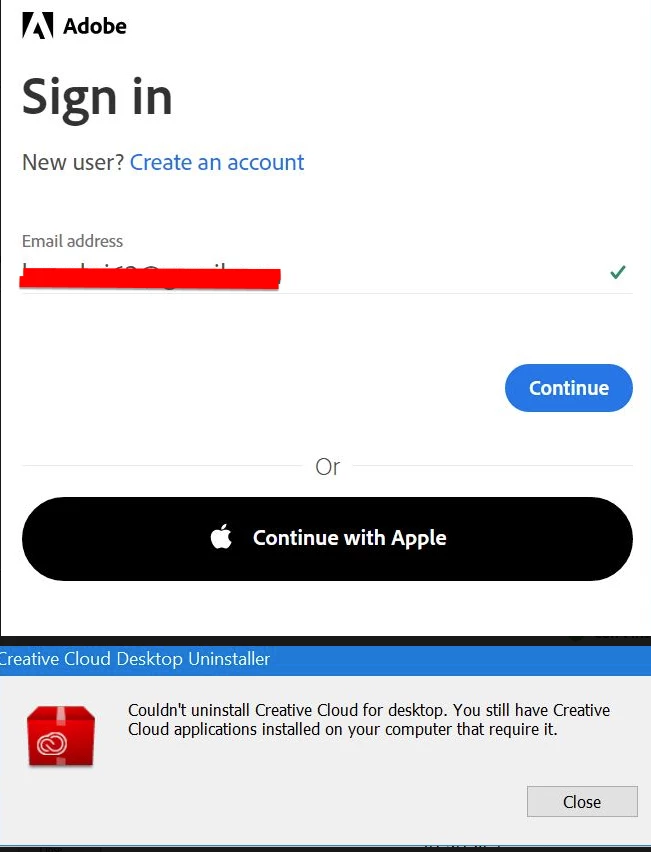
 

<edited to remove personal info-kglad>


Please help. I can log into my account on a web browser fine, but can't update Animate


through it. I cannot uninstall the creative cloud app, because my computer says other applications need it to function.


This topic has been closed for replies.

1 reply

kglad
Community Expert
Community Expert
May 22, 2022

sign out, restart your computer and then back in to your cc desktop application using the same adobe id used to verify your subscription: http://helpx.adobe.com/creative-cloud/kb/sign-in-out-creative-cloud-desktop-app.html


if that fails,


reset the cc desktop app: make sure it's in the foreground, then press:

Win: Ctrl + Alt + R
Mac: Cmd + Opt + R

if that fails, try to repair
https://helpx.adobe.com/download-install/kb/creative-cloud-install-stuck.html

if that fails go ahead and uninstall using the correct uninstaller from https://helpx.adobe.com/creative-cloud/help/uninstall-creative-cloud-desktop-app.html#sa_src=web-messaging and then reinstall

if that fails, do a clean cc install following each applicable step:

uninstall every cc app including preferences, https://helpx.adobe.com/creative-cloud/help/uninstall-remove-app.html


then uninstall the cc desktop app, again using the correct uninstaller, https://helpx.adobe.com/creative-cloud/help/uninstall-creative-cloud-desktop-app.html#sa_src=web-messaging


clean your computer of cc files per http://www.adobe.com/support/contact/cscleanertool.html


check for, and if available, update your os


repair all ms visual c++ versions that can be repaired.


update your ms visual c++, if it can be updated


restart your computer (don't skip this)


reinstall the cc desktop app, https://creativecloud.adobe.com/apps/all/desktop?action=install&source=apps&productId=creative-cloud


if you're unable to download the cc desktop app at this stage, use the link at the bottom of the page at https://helpx.adobe.com/download-install/kb/creative-cloud-desktop-app-download.html
use the desktop app to install your cc programs/trials