

mikeroush
Participant
August 3, 2023
Question

Can you set a keyboard shortcut to exit a symbol?
  • August 3, 2023
  • 1 reply
  • 219 views

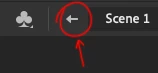
 Does anyone know of a way to set a keyboard shortcut for this little back arrow in the navigation bar above the stage? I don't know the name of this button so am not sure how to assign a shortcut to it.


I use a "enter graphic at current frame" plugin all the time and it would be great to have the ability to "exit graphic". Would make navigating nested symbols a little faster.


~mike

    This topic has been closed for replies.

    1 reply

    JoãoCésar17023019
    Community Expert
    Community Expert
    August 3, 2023

    Hi.


    You can use the shortcut Cmd/Ctrl + E to go back to the main timeline view or you can assign a shortcut to a JSFL command that contains the following instruction:

    an.getDocumentDOM().exitEditMode();


    Please read this topic for more details:

    https://community.adobe.com/t5/animate-discussions/create-a-shortcut-with-two-actions/m-p/13936684#M366968


    Regards,

    JC

    mikeroush
    mikeroushAuthor
    Participant
    August 25, 2023

    I'm finding the Cmd/Ctrl+C does work on my mac. Am I doing something wrong?

    I also want to step back throw the nested symbols and not go all the way back to the main timeline. 

    Is there a way to do this?