
Participant
July 8, 2023
Question

Cannot check "Allow Smoothing" for multiple images at once, but can with single images

  • July 8, 2023
  • 4 replies
  • 223 views

hey guys! if you are even reading this, im having a problem with Adobe Animate's "Allow Smoothing" feature. For example, i Ctrl + A, go to Properties and change the smoothing, but it doesnt work! 
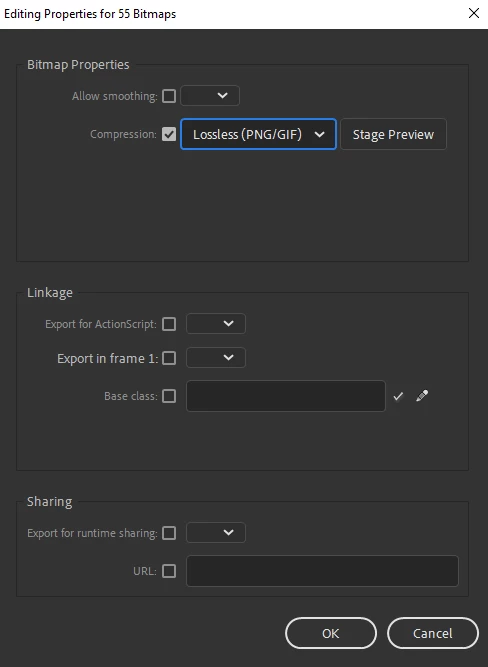
the result.... 
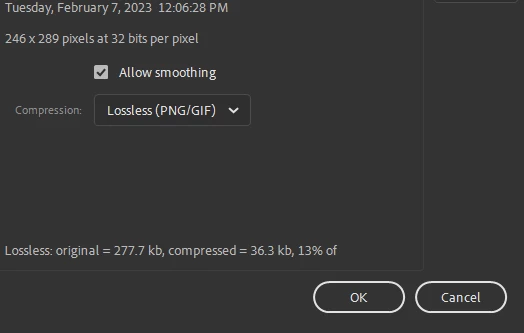
 

However, when done for singular images, un-ticking the box and all, it works! However, i dont want to go through 90+ frames ticking a box, and the way to do it for all the images doesnt work! If anyone has a solution, I will be so thankful!


    This topic has been closed for replies.

    4 replies

    Firewood:D
    Inspiring
    July 9, 2023

    Hey buddy, here is a script that can set all bitmaps in the library to lossless smoothing. I'll share with you.

    One-click modify bitmap lossless smoothingJSFL:

    var lib = fl.getDocumentDOM().library;
    for(var i=0;i<lib.items.length;i++){
    	if (lib.items[i].itemType=='bitmap'){
    		lib.items[i].allowSmoothing = true;
    		lib.items[i].compressionType = "lossless";
    	}
    }
    alert("All bitmaps are lossless and smooth!");

    Copy the code, paste it into the new text, and change the text suffix to .jsfl

    Mario_CR
    Community Expert
    Community Expert
    July 8, 2023

    You can also take all the bitmaps from the Library and change the smoothing from there. Highlight them, right click and choose Properties... There's no need to select them on stage.

    Community Expert
    July 9, 2023

    I agree with @Mario_CR 

    JoãoCésar17023019
    Community Expert
    Community Expert
    July 8, 2023

    Hi.


    This issue used to happen in some versions of Animate.


    You can either update Animate - if you haven't - or you can try the script below.


    Set Smoothing of Selected Items JSFL:

    var dom = fl.getDocumentDOM();
    var lib = dom.library;
    var selectedItems = lib.getSelectedItems();
    
    function main()
    {	
    	if (!dom)
    	{
    		alert("Please open a FLA first.");
    			return;
    	}
    
    	if (selectedItems.length === 0)
    		return;
    	
    	var uiList =
    	[
    		"<dialog title='Set Smoothing of Selected Items' buttons='accept, cancel'>",
    			"<script>" + setItems.toString() + "</script>",
    			"<radiogroup id='allow'>",
    				"<radio label='True' value='true'/>",
    				"<radio label='False' value='false'/>",
    			"</radiogroup>",
    			"<spacer/>",
    		"</dialog>"
    	];
    
    	var dialog = fl.xmlPanelFromString(uiList.join(""));
    
    	if (dialog.dismiss === "accept")
    		setItems();
    }
    
    function setItems()
    {	
    	var dom = fl.getDocumentDOM();
    	var lib = dom.library;
    	var selectedItems = lib.getSelectedItems();
    	
    	if (selectedItems.length === 0)
    		return;
    	
    	var xmlUi = fl.xmlui;
    	var allow = xmlUi.get("allow") === 'true';
    		
    	selectedItems.forEach(function(item)
    	{
    		if (item.allowSmoothing !== undefined)
    			item.allowSmoothing = allow;
    	});
    }
    
    main();

    (you can just copy and paste the script above and save it as a .jsfl file if you want)


    Download / file / script:

    https://bit.ly/3XEcv6Z


    I hope it helps.


    Regards,

    JC

    kglad
    Community Expert
    Community Expert
    July 8, 2023

    when you select multiple bitmaps>properties>tick allow smoothing do you select "yes" from the dropdown?