Known Participant
February 4, 2020
Answered

Cannot install HTML5 Canvas Audio Component Extension!

  • February 4, 2020
  • 3 replies
  • 4266 views

Please can someone tell me if the HTML5 Canvas Audio Component is compatible with Animate 19.2.1.

I have tried all sorts of ways to try and install it:

- Directly from extensions web site

- Manually using Anastasiy Extension Manager application

- Manually using ZXPInstaller application

- Manually using ExManCmd command line manager

Nothing seems to work.

The zxp file seems to be more than a renamed .zip file so I can extract it manually.

If someone can please help with any information on compatibility and any other methods I could use to install the extension.

Thank you.

This topic has been closed for replies.
Correct answer n. tilcheff

Hi mate,


From what I see, it puts just this folder called "audio" in HTML5Components in Config.


So I repackaged for you and here is a ZIP with the folder and files:

https://drive.google.com/file/d/1IxZVxLsSGaCHjh96P_63ewwX3y5wgpwC/view?usp=sharing

Unzip and put the folder called "audio" inside your HTML5Components in Config


You should do this while Animate is closed.

Find your Config folder:

on Win:

C:\Users\YourUserName\AppData\Local\Adobe\Animate CC YourVersion\YourLocale\Configuration

on Mac:

HD\Users\YourUserName\Library\Application Support\Adobe\Animate CC YourVersion\YourLocale\Configuration
 
Then find HTML5Components and put the 'audio' inside.
 
Start Animate (19.2.1).
Create a HTML5/Canvas file.
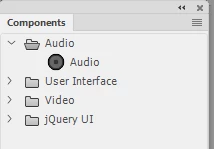
Open Components.
 
Hope this helps!
 

3 replies

Participating Frequently
July 9, 2020

Hi I added audio component. I have Autoplay problem. I ticked autoplay but sound didnot autoplay. I uncheck autoplay but sound did not autoplay.

I try to change in js code(components.js).

I changed " {"name": "PROP_AUTOPLAY", "variable": "autoplay", "type": "Boolean", "default": "true"}," 

but not working. 

Please help how can ı autoplay sound.

Participating Frequently
July 9, 2020

Also, when adding the component, if you cannot see the component properties directly in the properties menu, you can find it from the picture I have specified below. I hope you have experienced this problem will help you. Maybe someone can help me with my problem.

Joseph Labrecque
Community Expert
Community Expert
February 4, 2020

Hmmm - it should work with 2018, 2019, and 2020... I'm the author so am worried if it isn't working for some people!

phd3Author
Known Participant
February 4, 2020

It was the installation of the extension that I had trouble with.

On various attempts,depending on what method I tried, it was saying things like:

Invalid license

Unable to connect

Not compatable with software version


Some of which were as Error Code references.


I'm behind a company firewall, so I don't know if that was mucking things up.

It seemed to be trying to validate licensing during the installation, via various web-site interactions.

Anyway, extracting the unencrypted version above to the correct location seems to install correctly.

Joseph Labrecque
Community Expert
Community Expert
February 5, 2020

Hmmm - that may be why. I believe it is encrypted via the Adobe system. Thank you! 

n. tilcheff
n. tilcheffCorrect answer
Legend
February 4, 2020

Hi mate,


From what I see, it puts just this folder called "audio" in HTML5Components in Config.


So I repackaged for you and here is a ZIP with the folder and files:

https://drive.google.com/file/d/1IxZVxLsSGaCHjh96P_63ewwX3y5wgpwC/view?usp=sharing

Unzip and put the folder called "audio" inside your HTML5Components in Config


You should do this while Animate is closed.

Find your Config folder:

on Win:

C:\Users\YourUserName\AppData\Local\Adobe\Animate CC YourVersion\YourLocale\Configuration

on Mac:

HD\Users\YourUserName\Library\Application Support\Adobe\Animate CC YourVersion\YourLocale\Configuration
 
Then find HTML5Components and put the 'audio' inside.
 
Start Animate (19.2.1).
Create a HTML5/Canvas file.
Open Components.
 
Hope this helps!
 
Nick - Character Designer and Animator, Flash user since 1998 | Member of the Flanimate Power Tools team - extensions for character animation
phd3Author
Known Participant
February 4, 2020

Many thanks, that worked a treat!