


Participant
September 6, 2020
Answered

Canvas in Animate disappeared

  • September 6, 2020
  • 1 reply
  • 1072 views

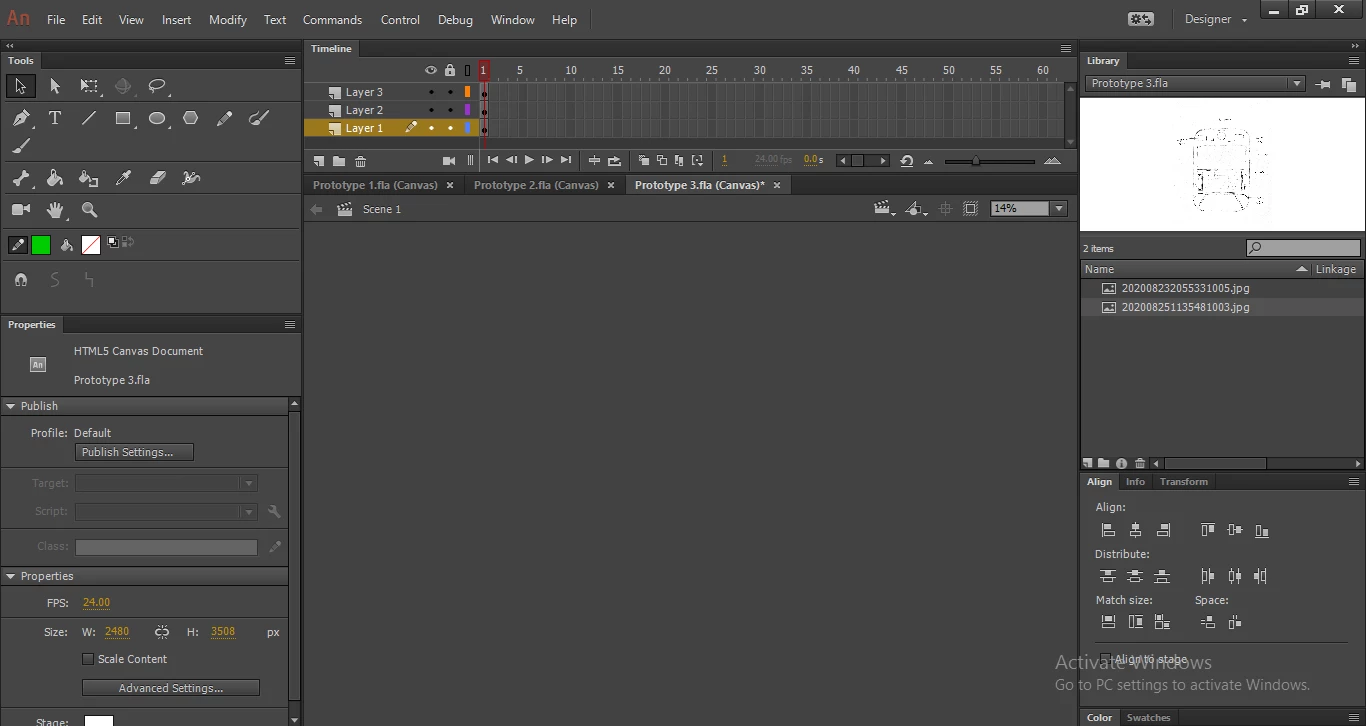
I'm not sure what I did but my canvas and my work are suddenly gone? There is only the grey background and I don't know how to get it back. Please help me as I'm new to Animate and I'm not sure what just happened.

 

This topic has been closed for replies.
Correct answer kglad

your stage is scaled to 14% so it's going to be small and it's probably only visible if you use scrollbars (which should be visible on the right side and are not, and are not visible at the bottom but it's not clear if they should be visible).


so first, see if there's a scroll bar at the base of animate in the region of the stage.


if not, try changing that 14% to 100%. 


if that fails, change your workspace (windows>workspace)

1 reply

kglad
Community Expert
kgladCommunity ExpertCorrect answer
Community Expert
September 6, 2020

your stage is scaled to 14% so it's going to be small and it's probably only visible if you use scrollbars (which should be visible on the right side and are not, and are not visible at the bottom but it's not clear if they should be visible).


so first, see if there's a scroll bar at the base of animate in the region of the stage.


if not, try changing that 14% to 100%. 


if that fails, change your workspace (windows>workspace)

Julia5FBBAuthor
Participant
September 6, 2020

I think there was something wrong with the software because after I changed the workspace it told me that it's not responding. But I was able to recover the file after restarting. Thank you.

kglad
Community Expert
Community Expert
September 6, 2020

you're welcome.


p.s. frequently save your animate work with increasing version numbers appended to your project to ensure you don't loose significant amounts of your work.