
Answered
Canvas transparency issues
I just reinstalled flash and reset all settings. Now when i go into a symbol, all other assets on the main timelines are still fully visible instead of going opaque. Does anyone know which setting this is?

I just reinstalled flash and reset all settings. Now when i go into a symbol, all other assets on the main timelines are still fully visible instead of going opaque. Does anyone know which setting this is?
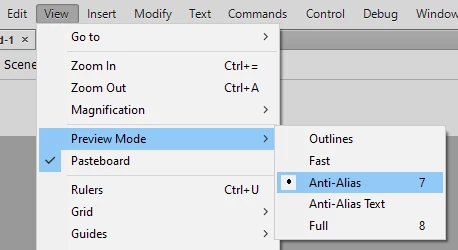
Check the View > Preview Mode menu. Make sure it's not set to Full.
Already have an account? Login
Enter your E-mail address. We'll send you an e-mail with instructions to reset your password.


 AdChoices