
signifiernyc
Participant
June 5, 2019
Question

cephtmlengine on Animate CC

  • June 5, 2019
  • 3 replies
  • 1293 views

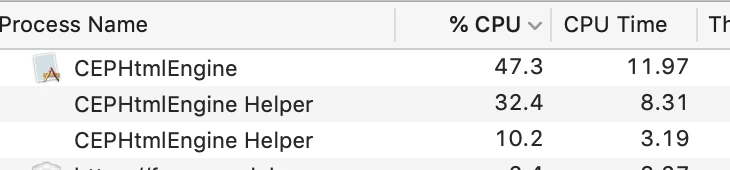
cephtmlengine is taking up an incredible amount of my CPU usage. This has been discussed in other forums with adobe providing a solution but it only addresses other apps, not Animate, so it's not possible to apply the solutions to Animate.

So my question is-- how do i fix the cephtmlengine problem that is happening on Animate. I'm on the latest version of Animate on a mac.
This topic has been closed for replies.

3 replies

Simon Lucas
Known Participant
May 17, 2022

My work-around solution is this:

Open the Animate application with Crtl-Click 'Show Package Contents'

Go to Contents/MacOS

Delete (or move to desktop) the file CEPHtmlEngine


Caveat Emptor:

NB1. Do this at your own risk

NB2. This will disable the New File dialogue. So get around that either use New Template or creating a standard Flash file with your prefered settings before you make the change. Then use a copy of that file to start new projects, eduting is settings as needed.

NB3. This has the added benefit of removing a lot of distracting pushed 'content' from your Animate interface

NB4. I have only tried this on Animate 2019 so far.

NB5. If anyone on this forum does not approve of my suggested work-around, then please come up with a better one.

n. tilcheff
Legend
May 17, 2022

Works on all versions on Mac.

I always do it to not allow gigabytes of Adobe crap to be downloaded after each update.


On Win I block the engine via an advanced rule in the firewall.


Nick - Character Designer and Animator, Flash user since 1998 | Member of the Flanimate Power Tools team - extensions for character animation
Participant
August 21, 2019

I have the same problem and it is really annoying because my mac book has its fan on full power all the time! It sucks a lot of battery, too. I can just force quit the damn CEPHTMLENGINE every 5 minutes! Like wrote the info on how to close it for good in other programs does not apply in animate. I checked and everything is different. There aren't even com.adobe.DesignLibraries.xxx files that you could try and remove or anything....

kglad
Community Expert
Community Expert
June 6, 2019

High CPU usage due to CEPHtmlEngine looks like it can easily be applied to animate, if you think it's the problem.

signifiernyc
Participant
June 6, 2019

No, i already went through that link. The reason i posted this as a new question is because that link does not address how to fix it in Animate. The folder locations they give are for other apps, and the folders in animate are not the same, so it's not clear what needs to be replaced.

kglad
Community Expert
Community Expert
June 6, 2019

it doesn't address it but it's obvious from looking at the ps, dw, id, ai, premiere fixes, how to apply to animate.

if you can't see that or that fix fails, using a browser that allows popups and cookies,  contact adobe support during pst business hours by clicking here and, when available, click 'chat', http://helpx.adobe.com/x-productkb/global/service-ccm.html