
Inspiring
June 22, 2021
Question

Change default Compression in Import to Stage/Library settings

  • June 22, 2021
  • 1 reply
  • 1197 views

I would like to change the compression default so that each time I import images to the Stage or Library, Lossless is set. In Export settings there is no Lossless setting, only what's shown in the included image which doesn't seem to affect the default Import settings. I also can't find a way to set the Default Profile or create another profile that is available everytime I make a new FLA file.


Thanks in advance!
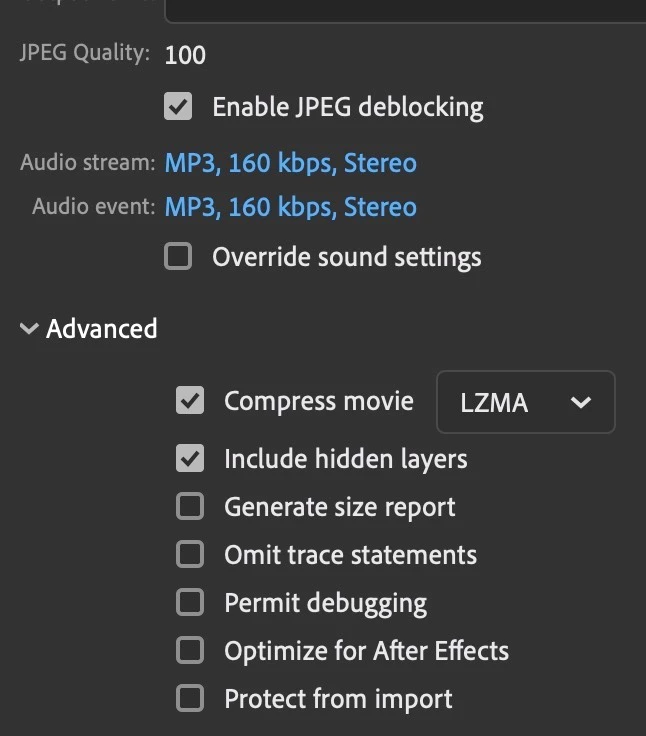


This topic has been closed for replies.

1 reply

Legend
June 22, 2021

There's no such thing as a default image compression. Whenever you import an image Animate tries to figure out whether Photo or Lossless is appropriate. Often it guesses wrong.


The best you could do is use a script to automatically force the compression of all bitmaps in the library to Lossless.

dr_melzieAuthor
Inspiring
June 24, 2021

When a setting is automatically set to be a certain value any time that setting is accessed, that by definition is a default value. In this case, Lossy is the default value for images imported into an Animate FLA file. The import dialog does have a "Use publish setting" option which is auto selected but there is no Lossless option for in the publish setting. I import from Photoshop files that usually have multiple layers. So making a script isn't really an option because you have to first select the desired PS layer(s) to import before the options are displayed.


I don't see Animate trying to guess anything since every image I select has exactly the same default options set. Nor do I understand what you mean by "Photo or Lossless."


So it seems that I have to manually select Lossless each time I import. 


Legend
June 24, 2021

"When a setting is automatically set to be a certain value any time that setting is accessed, that by definition is a default value. In this case, Lossy is the default value for images imported into an Animate FLA file."


I just imported a GIF and a low-color PNG into Animate, and they both "defaulted" to lossless compression in the library. Animate appears to apply some heuristic when importing to decide which compression is most appropriate.


"Nor do I understand what you mean by "Photo or Lossless.""


When I say a script, I meant a script that you would run in Animate after importing, that would set all imported bitmaps to lossless compression. This would be significantly less effort than changing the compression for every bitmap manually.