
Known Participant
October 17, 2018
Answered

Changing workspace/timeline color in Animate CC 2019

  • October 17, 2018
  • 1 reply
  • 3510 views

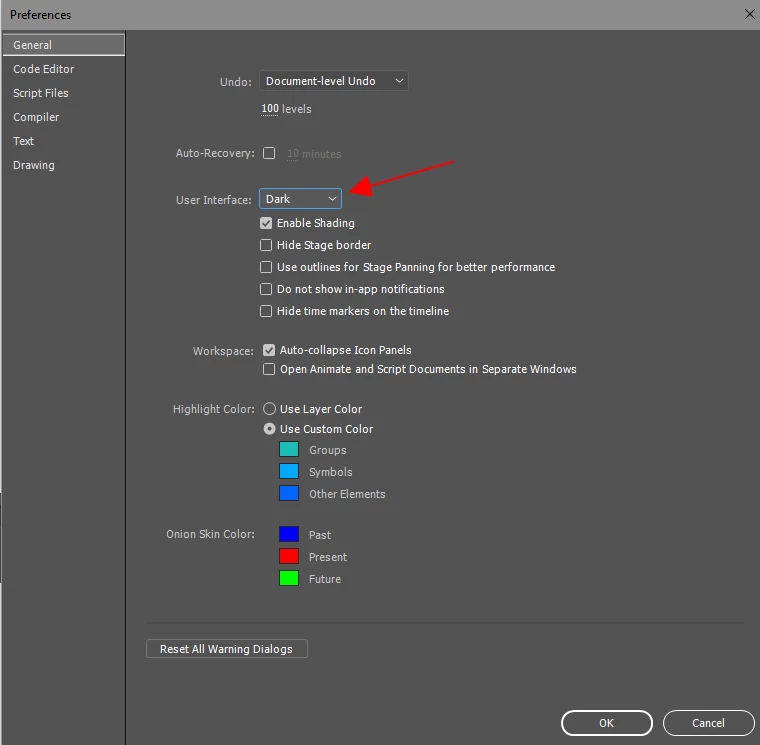
Just downloaded the latest version of Animate CC. The timeline and the stage background is a dark grey. I don't mean the stage, I mean the area outside the stage. It is very hard for me to see this dark color. Is there a way to change this like there is in other Adobe apps? Looking in preferences there is (or at least I didn't see it) no option to change this.

Thanks in advance for any help.
This topic has been closed for replies.
Correct answer kglad

click edit>preferences and chose your ui shade.

1 reply

kglad
Community Expert
kgladCommunity ExpertCorrect answer
Community Expert
October 17, 2018

click edit>preferences and chose your ui shade.

sacrtcAuthor
Known Participant
October 17, 2018

Thanks much. That worked for me (as you knew it would). Have a great one!

kglad
Community Expert
Community Expert
October 17, 2018

you're welcome.