
Inspiring
February 9, 2017
Answered

Check input fields with Array

  • February 9, 2017
  • 1 reply
  • 679 views

Hi All,

I'm making a quiz where the user inputs the answer into an input box. I've been trying to use an array to check the answer against.

I have set it up to have 1 question per frame and want to have an array with multiple answers to the question on the frame.

What I currently have;

var CorrectAnswer1: Array = ["DBMS", "dbms", "Database Management System"];

submit.addEventListener(MouseEvent.CLICK, check)

function check(e: MouseEvent): void {

  if (ans1.text == CorrectAnswer1[0,1,2]) {

  result1.text = "Correct";

  } else {

  result1.text = "Incorrect";

  }

}

The error it gives;

ReferenceError: Error #1069: Property 2 not found on Number and there is no default value.

  at UniversalRevision_TEST_fla::MainTimeline/check()

I also tried;

var CorrectAnswer1: Array = new Array ["DBMS", "dbms", "Database Management System"];

Can anyone point me in the right direction how to properly use an array and check against it?

Here's what the frame looks like:
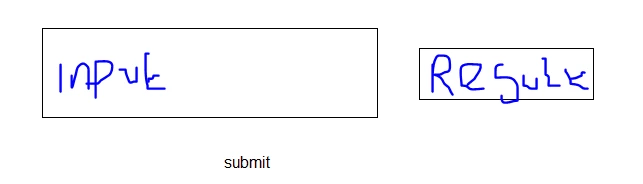
Pardon the really bad writing, not easy with a mouse

Thanks,

Jack

This topic has been closed for replies.
Correct answer ClayUUID

This right here:

if (ans1.text == CorrectAnswer1[0,1,2])

No, no, noooooo. Comparisons do not work that way. Comparison operators only work between two specific values, not one value and an entire array (also the array syntax itself is invalid). You have to manually loop over the entire array and check against each element. Something like...

var i:Number;

var correct:Boolean = false;

var txt:String = ans1.text.toLowerCase();

for (i = 0; i < CorrectAnswer1.length; i++) {

     if (txt == CorrectAnswer1) {

          correct = true;

          break;

     }

}

if (correct) {

     result1.text = "Excellent";

}

else {

     result1.text = "Bogus";

}

Note that by applying toLowerCase() to the answer string you don't have to faff about with uppercase/lowercase variations of your answers.

Ah, wait, I see AS3 supports the indexOf() method on strings. In that case you can simplify things quite a bit:

if (CorrectAnswer1.indexOf(ans1.text.toLowerCase()) != -1) {

     result1.text = "Acceptable";

}

else {

     result1.text = "Unacceptable!";

}

1 reply

ClayUUIDCorrect answer
Legend
February 9, 2017

This right here:

if (ans1.text == CorrectAnswer1[0,1,2])

No, no, noooooo. Comparisons do not work that way. Comparison operators only work between two specific values, not one value and an entire array (also the array syntax itself is invalid). You have to manually loop over the entire array and check against each element. Something like...

var i:Number;

var correct:Boolean = false;

var txt:String = ans1.text.toLowerCase();

for (i = 0; i < CorrectAnswer1.length; i++) {

     if (txt == CorrectAnswer1) {

          correct = true;

          break;

     }

}

if (correct) {

     result1.text = "Excellent";

}

else {

     result1.text = "Bogus";

}

Note that by applying toLowerCase() to the answer string you don't have to faff about with uppercase/lowercase variations of your answers.

Ah, wait, I see AS3 supports the indexOf() method on strings. In that case you can simplify things quite a bit:

if (CorrectAnswer1.indexOf(ans1.text.toLowerCase()) != -1) {

     result1.text = "Acceptable";

}

else {

     result1.text = "Unacceptable!";

}

Inspiring
February 9, 2017

Thanks ClayUUID​, the code is working without errors. This is how I've implemented it;

var CorrectAnswer1: Array = ["DBMS", "Database Management System"];

var i: Number;

var correct: Boolean = true;

var txt: String = ans1.text.toLowerCase();

for (i = 0; i < CorrectAnswer1.length; i++) {

  if (txt == CorrectAnswer1) {

  correct = true;

  break;

  }

}

submit.addEventListener(MouseEvent.CLICK, check)

function check(e: MouseEvent): void {

  if (correct) {

  result1.text = "Excellent";

  } else {

  result1.text = "Bogus";

  }

}

I noticed you said that my syntax is wrong, any advise on what I need to change for my var CorrectAnswer1: Array?

Also var Correct returns "Excellent" or "bogus" depending on if it is true or false, do I need to put the answers there?

Thanks again!

Legend
February 9, 2017

Why are you using the long version of the code instead of the short version of the code?

And... why did you split it in half and put some of it in the initialization section and some of it in the event handler???