
Inspiring
March 16, 2023
Question

choosing a specific layer when importing to a stage

  • March 16, 2023
  • 2 replies
  • 532 views

Hi!!

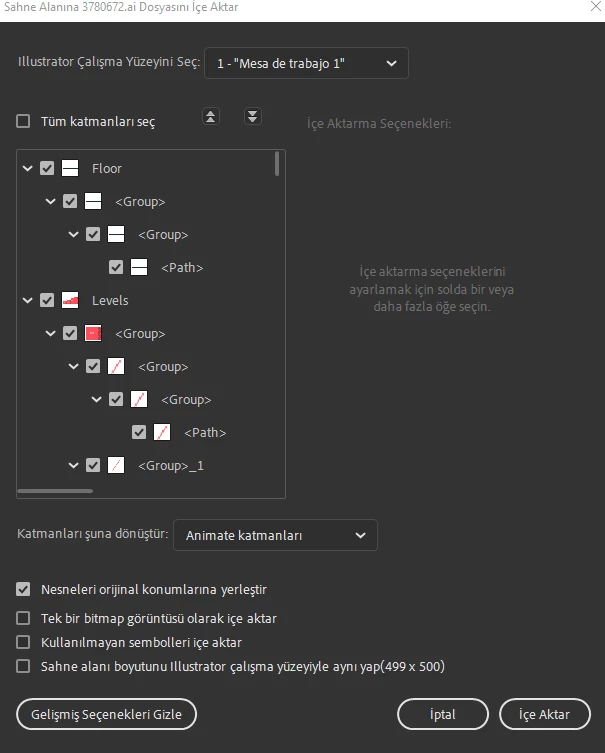
When I import my ai file, I would like to import a specific layer rather than the whole layers. I know that before importing, import to a stage setting windows pop up. However, the layer pictures are very small and confusing which it hard to select a specific layer. Is there any easy way to deal with it, or should I keep importing the all layers to the stage and delete the ones I don't need?


the confusing window:
 

This topic has been closed for replies.

2 replies

Mario_CR
Community Expert
Community Expert
March 16, 2023

Simple copy-pasting from Ai to Animate works as well.

Inspiring
March 17, 2023

It sounds very simple, but  I just want the specific layers

Mario_CR
Community Expert
Community Expert
March 17, 2023

Then just copy the specific layers.

kglad
Community Expert
Community Expert
March 16, 2023

i think it would be best to create a new movieclip and import to that stage.  you can then maintain those layers in the movieclip but easily add that movieclip to any main timeline frame/layer you wish.

Inspiring
March 17, 2023

When I do that the assets I import to the stage still distribute in the timeline separately.


Lastly, I didn't really get what did you mean by creating a new movie clip?


Is there any video or article that explains that? I know that t is very simple but I cannot figure this out.


Many thanks,

kglad
Community Expert
Community Expert
March 17, 2023

@gokcenuri10265139 


click insert>new symbol> select movieclip > ok


now start the import process and select the layers you want to import.