

Michael_Mansfield
Participating Frequently
November 28, 2021
Question

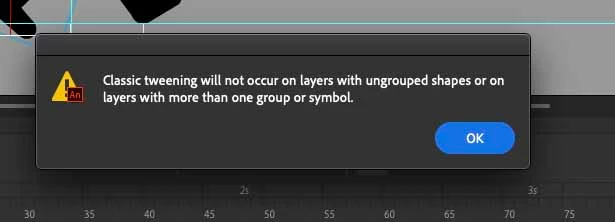
Classic tweening will not occur on layers with ungrouped shapes, but I can't find offending objects

  • November 28, 2021
  • 4 replies
  • 2841 views

Hi Animate Community


Sorry for this probably very simple problem, but it's really got me stumped.

The tweens work perfectly in Animate but I can't export the files or test the files in a browser because of the warning sign says...

"Classic tweening will not occur on layer with ungrouped shapes or on layer with more than one group or symbol."

It's usually a simple fix, I just makesure there are not more than one object, object ungrouped or multiple symbols on the offending layer.

But I've locked all other layer and explored everywhere and can't find any multiple object, ungrouped object or symbols.

All I can think is maybe I have some hidden object locked away?

I'm sure it's something simple I just can't figure it out, I have made some video's but I'm not allowed to post them on here for some reason.


yours sincerely

Mike
 

    4 replies

    Michael_Mansfield
    Participating Frequently
    March 27, 2023

    @Myra Ferguson @_keyframer @Nick Gioia 

    I worked out what was the problem for this. 

    There was a single keyframe at the end of a few of the layers that hand a tween applied to them.

    I just had to remove these tweens and it exported perfectly without the error sign comming up.

    Community Expert
    March 28, 2023

    Glad to hear you figured it out. 

    Michael_Mansfield
    Participating Frequently
    March 28, 2023

    Only took 3 years to let you all know, sorry for that. I must have got distracted.

    _keyframer
    Community Expert
    Community Expert
    December 15, 2021

    That's a very misleading error message. Classic Tweens can't be applied to shapes whether they are grouped or ungrouped. Classic tweens can ONLY be applied to a symbol instance, one per layer, between keyframes. Follow these steps:

    1. Draw something
    2. Select it and convert it to a Symbol
    3. Insert a keyframe further down the timeline on the same layer
    4. Transform the Symbol's position, scale, rotaion, and or color effect on one of the keyframes
    5. Apply a Classic tween

    Result: You'll see the interpolation between keyframes when you play the timeline.

    Animator and content creator for Animate CC
    Community Expert
    December 14, 2021

    Have you made your objects into movie or graphic symbols? 

    You shouldn't animate objects. 

    Myra Ferguson
    Community Expert
    Community Expert
    December 14, 2021

    You could try turning off the visibility of the other layers to seach that layer. It might also help to show that layer as outlines (click on the color rectangle to the right of the layer name) to help you see what's on it better.

    Participant
    February 4, 2025

    Well that helped to get closer in solving one of my problems thnx ^^