
Participant
February 25, 2015
Answered

Code string coming up on line 1 that I didn't type

  • February 25, 2015
  • 2 replies
  • 363 views

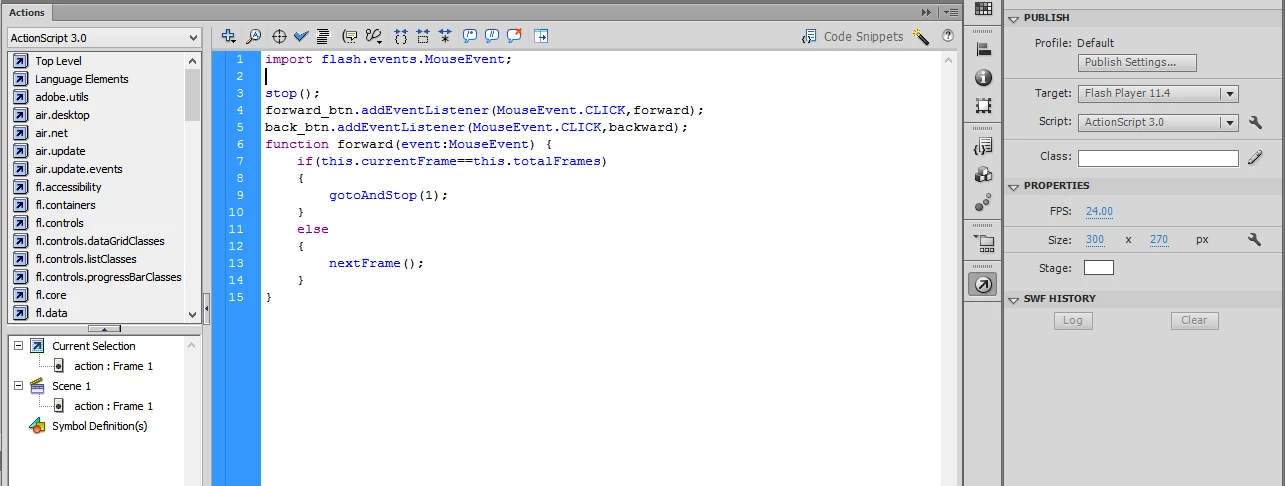
I am working on a tutorial in class, and I have gotten this string of code:

import flash.events.MouseEvent;

I'm not sure why I'm getting it, but I'm not typing it. I can delete it and if I save my file, it doesn't come back up. I can't figure out why it comes up.... It doesn't seem to affect anything, and the code runs correctly with it there or with it gone. Any help? (I added the screenshot just in case... )
This topic has been closed for replies.
Correct answer Ned Murphy

Flash automatically adds in import statements when you introduce different classes in the code.  Chances are it added the MouseEvent import as soon as you typed in MouseEvent for the event listener you added.

When you write code in a class file ( a separate .as file) you normally have to include all such import statements so that the compiler knows where to look.  While working in the Flash Actions panel you do not need to include most of them because the class path is defined within Flash, though there are a few that do need to be incorporated, such as the Tween class for example.

2 replies

Participant
March 2, 2015

Thank you both so much! I was able to find that the import code comes up when your code hints are enabled (it didn't come up to everyone in class, only a select few). So I guess I can turn off code hints and it wouldn't come up. Thank you both so much for your information! It helped SO much!!

Ned Murphy
Ned MurphyCorrect answer
Legend
February 25, 2015

Flash automatically adds in import statements when you introduce different classes in the code.  Chances are it added the MouseEvent import as soon as you typed in MouseEvent for the event listener you added.

When you write code in a class file ( a separate .as file) you normally have to include all such import statements so that the compiler knows where to look.  While working in the Flash Actions panel you do not need to include most of them because the class path is defined within Flash, though there are a few that do need to be incorporated, such as the Tween class for example.

Participant
February 25, 2015

Thank you! So this string of code doesn't change anything, then, right? Is there a way to make it not come up, or should I just leave it be?

Ned Murphy
Legend
February 25, 2015

You're welcome.  The string doesn't change anything and I think it will be a help to you to allow it to continue doing it.  I took a quick look but I can't find if there is a way to turn it off.  If you are just starting with AS3 then you will eventually understand why/when those lines are necessary at times.  Sometimes you do need to have such lines and you'll be happier they got added automatically... otherwise you'll likely end up scratching your head some day wondering why something correctly coded doesn't work (and it's because you needed to have an import line).