Collision with rotated object?
Hi!
I am currently making a game based on slicing other objects, basiclly when you hold down and drag your mouse and then release it an object that shows the cut will be created.
Sorry if its hard to explain :S maybe some code will be more appealing:
//Sliceline.as
package
{
import flash.display.Bitmap;
import flash.display.Sprite;
/**
* ...
* @7111211 @SaUrOnZ
*/
public class SliceLine extends Sprite
{
private var sliceT:SliceTexture;
public function SliceLine(fromX:Number, fromY:Number,rotation:Number, length:Number)
{
sliceT = new SliceTexture();
addChild(sliceT);
sliceT.x = fromX;
sliceT.y = fromY;
sliceT.width = length;
sliceT.rotation = rotation;
/*graphics.clear();
graphics.lineStyle(2, 0xFFFFFF);
graphics.moveTo(fromX, fromY);
graphics.lineTo(toX, toY);*/
}
}
}
Code for collision:
//Main.as
if (sliceArray.hitTestObject(cube))
{
cube.hit();
}else {
cube.nohit();
}
When my object is created it will be rotated, width & height corrected accordingly to the mouse initial and ending positions.
Here is a screenshot to help you understand how it looks like:
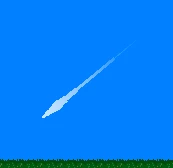
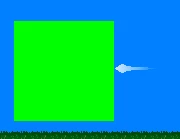
Now comes the problem. When i try to make it collide with another object it seems the bounds of the object increase when dragged diagonaly. While using it straight up/down/left/right the collision seems to be almost perfect.
Screenshot of up/down/left/right collision (green means not collided and red is collided):
Screenshot of diagonal collision (green means not collided and red is collided):
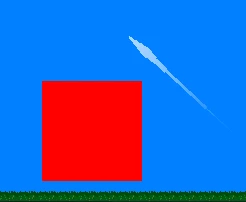
Is there some kind of way to make the diagonal collision work?
Any help is highly appreciated.
Many thanks, Erik Jansson
 AdChoices