
henryl53269518
Known Participant
February 2, 2018
Answered

Color fill block turn pure black after moving

  • February 2, 2018
  • 3 replies
  • 3486 views

Sometime when you drag multiple section each with different colors fills(gradient or pure color) simultaneously,

One of the section will turn into pure black( it's black not other color maybe because I use pure black fill to draw line contours?)

I try to cut the block and move the rest first, then paste the block and move it, but it will still turn black or even vanish .

But this situation is not frequently occurs, it seems totally random to me.

Is it a glitch or with a reasonable cause, because it's really annoying and inconvenient.

I believe this problem has been discussed before, but I don't know what key word should I use to search it.

If this is well discuss somewhere else, can anyone provide me a link to the article? thank you.
This topic has been closed for replies.
Correct answer Asymetrical

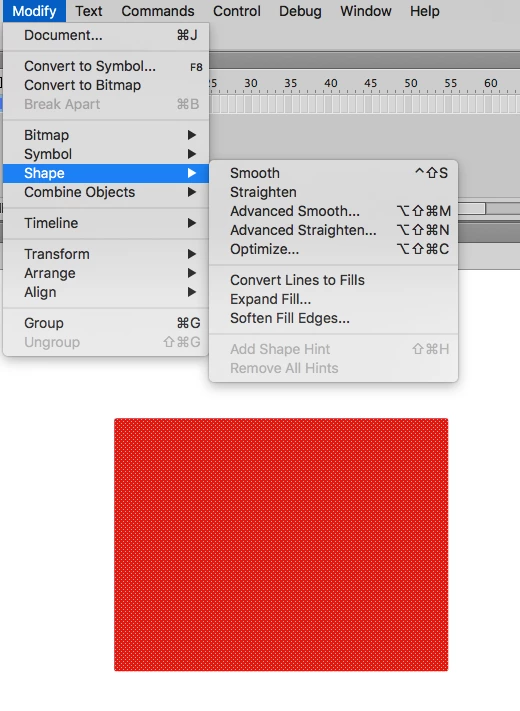
Yeah I've seen this many times but I haven't seen it with squares, just drawn art. The only thing I've found to fix it is to smooth the art slightly which will also work with squares.

3 replies

Participant
April 17, 2021

This still happens to me every once in a while--it's definitely a glitch. Slightly smoothing the object does not seem to ever solve the problem for me. I will either have to play with moving the object slightly until it is in the position I want it to be in, or I will have to just give up and redraw my object from scratch for that particular frame. Hope this bug can be fixed by Adobe.

Known Participant
June 12, 2024

Just encountered this for the first time in CC2024. Seems a pretty basic thing for a drawing program to have fixed several years ago.

Asymetrical
AsymetricalCorrect answer
Inspiring
February 5, 2018

Yeah I've seen this many times but I haven't seen it with squares, just drawn art. The only thing I've found to fix it is to smooth the art slightly which will also work with squares.

henryl53269518
Known Participant
February 8, 2018

Thank you for the tip, I actually use smooth all the time, because I draw complicated shape with lines. I don't know if this will work since I never try this, but I will definitely try to smooth the fill first next time I met this problem. Thank you.

Preran
Community Manager
Community Manager
February 2, 2018

I tried reproducing your issue on both my Windows and Mac OS, but was not able to. Would it be possible for you to create a short video of your issue and share it with us here?

Thanks,

Preran

henryl53269518
Known Participant
February 2, 2018

Thank you for your reply.

Few hours ago, I used a very indirect way  to overcome this problem.

(I try moving around all kind of fill block while remembering coordinate, then I finally get to move all set downward without issue)

Now I see your reply, then I go back, try to repeat the process, but the blocks is already move to the place I want, so I try to move all the same blocks set downward further(it's not an object), the weird problem didn't happen this time.

Just like I said, it's really peculiar, it cannot be intentionally produce and it's not happening very often. But when it happen it's a big headache.

The problem usually happen when there are multiple very small and complicated blocks of fills move simultaneously(again, it's not an object).

Then one of the small piece or few pieces turn in to a single black block.

I believe I've met this problem since Flash CS6, and this is still haunting me.

I'll have to record it until next time I met the same problem.

I thought this is common, so it's just me? Is there any one else have the same problem?

By the way, there is another problem might related to this one.

When I try to change brightness of a block of fill by dragging the number on the panel by mouse,

the saturation and hue would also change.

Is that normal? Or it's some kind of automatic adjustment of this program? I always wonder why that happen.

Preran
Community Manager
Community Manager
February 5, 2018

Hard for me to say. I don't use Flash CS6 anymore. Hopefully someone here has a better answer for you.