
Participating Frequently
May 21, 2024
Answered

Color Swatch colors not accurate / picking wrong colors

  • May 21, 2024
  • 2 replies
  • 2285 views

Hello, I recently upgraded Adobe Animate to 24.0.3, and the color panel's gradient square (use for picking colors) looks drastically different and does not accurately reflect the actual colors being picked at all. (e.g. in the screenshot, the color I selected is bright red, but the spot I'd had to click on to get bright red is showing light orange)
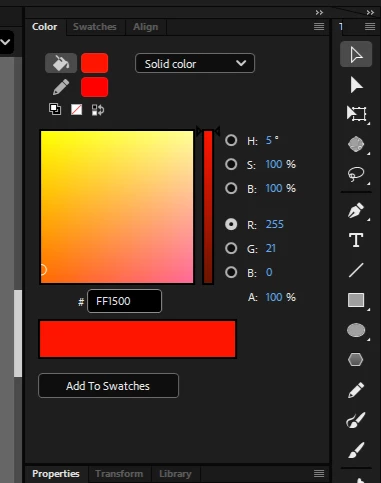

All RGB color picking options show wrong colors in the gradient square. Are there settings I should tweak on my end, or is this an issue with Adobe 2024 in general? 
Thank you. 
 

Correct answer n. tilcheff

@n. tilcheff 


how do you duplicate the problem?


@kglad  

As the OP, @hugh3540,  has stated in R G B modes there is a bug.


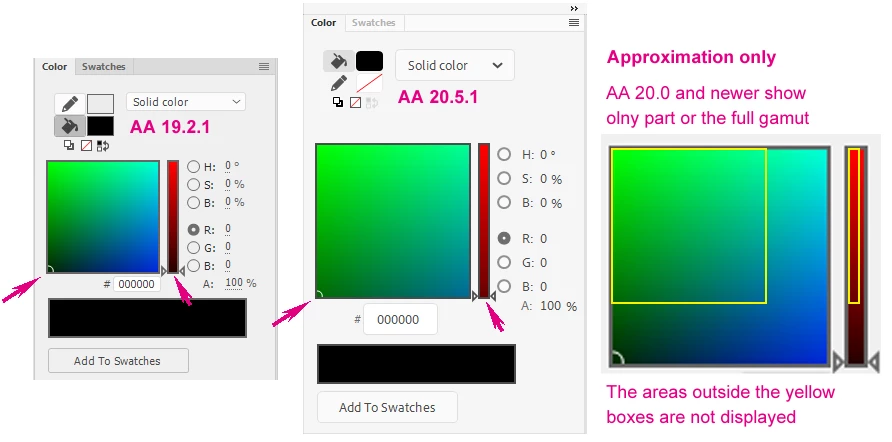
The problem consists of the gradient being displayed in the Color panel active picking areas not matching the actual color being chosen.

The gradients shown are stretched beyond the boundaries shown in the panel and only display part of the gamut.


Here is an illustration:

As I recall an attempt was made in 2019 during the prerelease phase to have a much larger color panel with the introduction of the new UI. Then it was scaled down to a more reasonable size. I believe that the bug originates there.


Hope this helps!


2 replies

JoãoCésar17023019
Community Expert
Community Expert
May 21, 2024

Hi.


Yeah, I have been noticing some inaccuracies in the Eyedropper Tool in recent versions of Animate. For example, if I need to get a color from a shape, I cannot do this from the root, but I have to instead go deeper in the hierarchy until where the shape is located.


I think some other users have reported problems to this tool in the Prerelease Forums as well.


Anyway, please also help letting the Animate team know about it through this link:

https://www.adobe.com/products/wishform.html


Regards,

JC

kglad
Community Expert
Community Expert
May 21, 2024

@JoãoCésar17023019 


i don't see this problem on win 10 animate 24.0.3.  is it restricted to mac versions?

JoãoCésar17023019
Community Expert
Community Expert
May 21, 2024

Don't know.


I have tested on Mac only.

hugh3540Author
Participating Frequently
May 21, 2024

I think the color picker simply isn't displaying the full spectrum, but is instead displaying the top left portion of the sull spectrum it represents. Here's what it looks like when I pick black: 


kglad
Community Expert
Community Expert
May 21, 2024

is your monitor display set at 100%?

hugh3540Author
Participating Frequently
May 21, 2024

Yep, this can't have anything to do with my monitor / display settings. I just upgraded from Animate 2017, where the color picker looked entirely different (using R mode). To get "black", I'd actually click a spot that looked black. Such a spot does not exist now 😞