
Known Participant
April 13, 2014
Question

Connect random falling object

  • April 13, 2014
  • 2 replies
  • 1078 views

Hi,

Im trying to create a game, where there are random falling dots (this was easy to create) and I want a line to connect each falling dots to create a moving zigzag kind of line

Thank you so much to take time to answer me !!!

This is my random falling dots code:

import flash.events.Event;

var createEnemyID:uint
var gameSpeed:uint

function initGame():void{
gameSpeed
=1000;
createEnemyID
=setInterval(createEnemy, gameSpeed);
}
function createEnemy():void{
var enemy:Faller=new Faller();
enemy
.y=-50;
enemy
.x=Math.random()*380
enemy
.addEventListener(Event.ENTER_FRAME,dropEnemy);
addChild
(enemy)
}
function dropEnemy(e:Event😞void{
var mc:Faller=Faller(e.target);

mc
.y+=10;
}

initGame
();

if what I'm trying to explain is not clear here  is a drawing of what I want
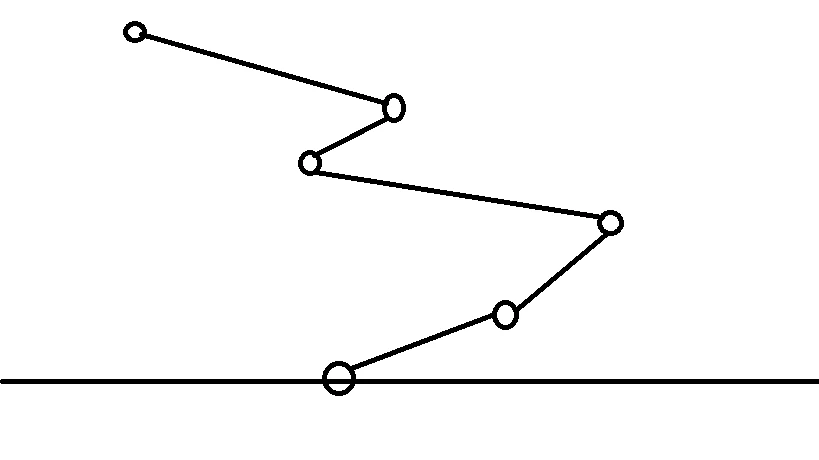

This topic has been closed for replies.

2 replies

Inspiring
April 13, 2014

I am not sure what you are trying to do but here is a code that creates connectors.

A couple of notes:

1. You should use Timer instead of interval.

2. You should as fewer ENTER_FRAME Event listeners as possible to improve you game performance.

The code reflects these two rules.

import flash.display.Graphics;

import flash.display.MovieClip;

import flash.events.Event;

import flash.events.TimerEvent;

import flash.utils.Timer;

var objectSpawner:Timer;

var fallers:Array;

initGame();

function initGame():void

{

          fallers = [];

          objectSpawner = new Timer(1000);

          objectSpawner.addEventListener(TimerEvent.TIMER, createEnemy);

          objectSpawner.start();

          addEventListener(Event.ENTER_FRAME, dropEnemies);

}

function createEnemy(e:TimerEvent):void

{

          var enemy:Faller = new Faller();

          enemy.y = -stage.stageHeight;

          enemy.x = Math.random() * 380;

          MovieClip(enemy).cacheAsBitmap = true;

          addChild(enemy);

          fallers.push(enemy);

          drawConnectors();

}

function dropEnemies(e:Event):void

{

          trace(fallers.length);

          for each (var mc:Faller in fallers)

          {

                    mc.y += 10;

                    if (mc.y > stage.stageHeight * 2)

                              fallers.splice(fallers.indexOf(removeChild(mc)), 1);

          }

          drawConnectors();

}

function drawConnectors():void

{

          if (fallers.length == 0)

                    return;

          var g:Graphics = this.graphics;

          g.clear();

          g.lineStyle(1);

          var mc:Faller = fallers[0];

          g.moveTo(mc.x, mc.y);

          for each (mc in fallers)

                    g.lineTo(mc.x, mc.y);

}

Known Participant
April 14, 2014

Thank you so much Andrei1

Inspiring
April 13, 2014

That should be easy, here is some code that will draw you a line, maybe add a timer to redraw the line every 1/100 of a second.

var myShape:Shape = new Shape();

myShape.graphics.lineStyle( thickness in pixels , color in hex format , alpha/transparency );

myShape.graphics.moveTo( x , y ); // x and y should be coordinates of first dot in the sequence, so (myDot.x, myDot.y)

myShape.graphics.lineTo(200, 200); // same as above, but for the second dot you want to connect

addChild ( myShape )

Do this for each set of dots, so in this case you would just do that to make 5 different lines.

Remember, you need to have a timer or something else update the position of the lines, or else they will stay put where the dots first appeared.

Known Participant
April 13, 2014

Thank you so much for your reply

Sorry I have trouble explaining,

I have 1 object falling randomly and in a loop, and I want to connect each object with the next one to create a kind of infinite zigzag falling

Inspiring
April 13, 2014

Yes, so just implement the code above, and maybe altar it to detect which order the zigzag needs to go in by have Lowest y value = 1st dot, highest y value = last dot.