
Inspiring
November 27, 2022
Answered

Control C shortcut not working

  • November 27, 2022
  • 2 replies
  • 1316 views

Hey,


So for Animate I have always used the control C/ control V shortcut to add keyframes. This has worked pretty well usually, and now it just stopped. It doesnt let me control c or control v anymore on animate, does anyone know how to fix it? I'm using a 2020 Imac.
    This topic has been closed for replies.
    Correct answer Colin Holgate

    You could use the standard key presses on Mac, of Option-Command-C and Option-Command-V. Adding Control-C and Control-V to the shortcuts does work, and would save you having to hold down two modifier keys. If you have used those before, they somehow have been cleared from your preferences, and you will need to add them again.

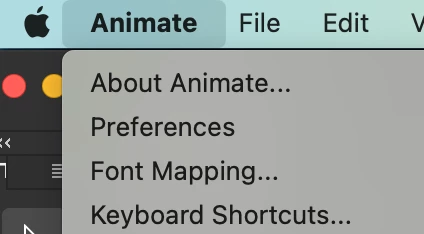
    The shortcuts are set in a different place on Mac, look in the Animate menu.


    <edited img-kglad>

    2 replies

    Colin Holgate
    Colin HolgateCorrect answer
    Inspiring
    November 27, 2022

    You could use the standard key presses on Mac, of Option-Command-C and Option-Command-V. Adding Control-C and Control-V to the shortcuts does work, and would save you having to hold down two modifier keys. If you have used those before, they somehow have been cleared from your preferences, and you will need to add them again.

    The shortcuts are set in a different place on Mac, look in the Animate menu.


    <edited img-kglad>

    Inspiring
    November 27, 2022

    ok this is exactly what i needed, tysm

    Community Expert
    November 29, 2022

    kglad
    Community Expert
    Community Expert
    November 27, 2022

    check and/or edit your shortcuts:  edit>keyboard shortcuts

    Inspiring
    November 27, 2022

    im doing that, but i dont see keyboard shortcuts anywhere

    kglad
    Community Expert
    Community Expert
    November 27, 2022

    what do you see when you click edit > keyboard shortcuts?