
control content display size on an interactive map
Hi all,
I’m new to Adobe Animate and have been building an interactive project and wondering if what I have in mind is possible.
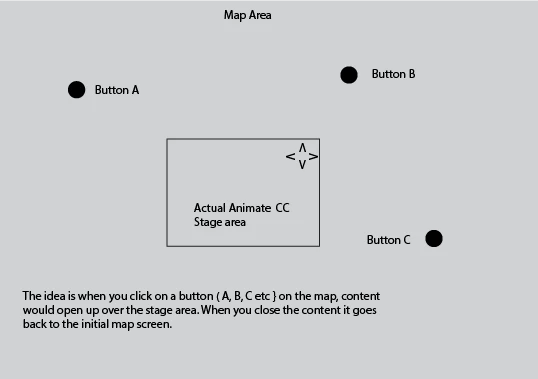
The project initially starts as a 800 x 550px, before becoming a much larger interactive map area ( thats within the project as a symbol). I also have an upper right corner navigation arrows in the main timeline that allows the user to move around ( via code using x and y coordinates )
I want to have spots on the map that users can interact with ( likely buttons inside the map symbol )
When the user clicks on a button, another sequence plays. At the end of this sequence a close button is available so the user can close this sequence, thus reverting back to the initial map state.
However I would like these various content sequences play at the full 800 x 550px project size ( which is what I’ve been creating the main content at ) but I can’t seem to get these to centre on the main stage.
So you basically navigate a map, clicking on various buttons that open to project size content with the ability to close the content afterwards.
My thought process so far: the buttons as I understand would have to be on the map ( and thus inside the map symbol )
But could I put the various content sequences on the main timeline ( after my initial into and map screen) and somehow use the buttons on the map symbol to play them?
It would seem to be easier to put everything within the map symbol, which is what I’ve already tried, but I still can’t get everything to line up.
I’m wondering if there is some kind of code one would use to make these sequences play full screen/centre screen while they were running.
Hopefully this is enough information of what I’m trying to do.
regards.
David


 AdChoices